
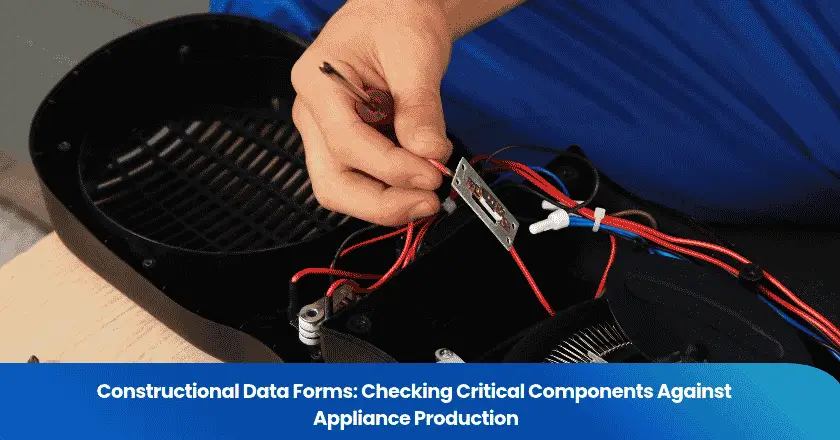
A Constructional Data Form, or CDF, is a record of the critical components identified for an evaluated product. For appliance production, use the current applicable CDF or critical-component list to compare the listed manufacturer, model, ratings and conditions with the parts actually fitted. Record the document version, component location and production scope. When a part differs, establish whether it is a documented approved alternative or a change awaiting technical evaluation. A physical match supports the construction checked; the CDF itself is not a standalone product certificate, and an ordinary inspection cannot approve a substitute.
What should a CDF production check retain?
- The current construction reference and covered appliance model.
- The connected component identity, ratings and applicable conditions.
- The actual installed part, evidence and production scope checked.
- A separate technical status and owner for any change.
Identify the CDF and the construction it controls
Start by identifying the record that controls the appliance being produced. Ask the file owner for the applicable construction reference, covered model or variant, relevant pages and revision status. Confirm the product standard and certification scheme where applicable. The document may be titled a CDF, critical-component list or part of a broader construction report; the title alone does not establish its approval status or coverage.
TÜV Rheinland’s public CDF guide defines a critical component as one identified during product evaluation as affecting safe operation or safety features under the applied standards. Such a component can be electrical, mechanical or structural. The list is therefore tied to the evaluated construction; it is not automatically every item in the bill of materials.
A bill of materials, or BOM, serves the broader manufacturing task of identifying the parts needed for a build. Keep the BOM and safety-critical construction references aligned, but preserve their different purposes. A packaging insert may belong in the BOM without being a safety-critical CDF entry. Conversely, a structural or insulating feature identified in the evaluated construction still matters even if purchasing staff treat it as a minor-cost item.
UL Solutions’ revision guide distinguishes an issued date from a page’s revised date and explains that its construction description uses text, photographs and drawings. This is an issuer-specific example of document control. Confirm the current released reference and relevant pages with the responsible file owner instead of assuming that the newest-looking spreadsheet is the controlling record.
Retain the file or report reference, appliance model, document status and applicable page revisions in the inspection brief. Include referenced drawings or construction notes needed to interpret a row. If a supplier sends an editable extract, ask how it corresponds to the released record. An extract can be useful working information, but it should not silently replace the source reference or omit a condition attached to an alternative.
Define which records and physical features will be compared before the visit. TradeAider’s inspection reference guide can support that scope discussion. Agree the appliance-specific references separately; a general inspection framework does not determine which components an issuing body has accepted.
Read the critical-component fields as a connected row
Read a CDF row as a connected description of one permitted component configuration. The manufacturer and full model identify the part; technical data and notes constrain its use. Do not combine the maker from one listed option, the model from another and the ratings from a third to create an alternative that the record never describes.
The TÜV Rheinland CDF example connects an object or part designation with the component manufacturer or trademark, type or model, and relevant technical data. It also includes conformity marks and standards where the certification scheme requires them. Read these entries together with the applicable notes; a familiar component name alone does not establish the listed construction.
Copy this CDF row-to-production comparison table for the applicable entries. The field names follow common public examples; the evidence and status columns are a recommended buyer record. Use the actual document’s headings and conditions rather than forcing every file into an identical form.
| Field or reference | What to compare | Evidence or status to retain |
|---|---|---|
| Document and row | Applicable file, page revision, appliance model and item reference. | Source record and exact row; unresolved coverage question. |
| Object or designation | Listed part designation and its location in the appliance or drawing. | Overview photo, location and drawing reference. |
| Manufacturer / trademark | Listed identity against the installed part and traceable records. | Legible marking; explain any supplier-to-maker distinction. |
| Type / model | Full model, suffix and documented permitted alternatives. | Actual identifier; match, difference or identification gap. |
| Technical data | Relevant ratings and units against the listed values and conditions. | Exact markings or accepted supporting record; no assumed equivalence. |
| Standard / conformity mark | Entries required by the applicable scheme and file. | Identified reference and mark; unresolved verification need. |
| Notes and conditions | Variant, installation or alternative-use limitations in the record. | Applicable note and observed configuration; technical question if unclear. |
A row number is a locator; establish component quantities from the actual construction information rather than assuming the row number is a count. Preserve complete model suffixes and qualifiers. If the factory uses a purchasing code that differs from the component manufacturer’s model, request the controlled cross-reference and evidence connecting it to the installed part.
Keep the construction-file issuer or authorized technical decision maker identified in the inspection brief. Record who compares the actual components with that file and who decides whether a discrepancy requires technical review.
Connect each listed component to the production appliance
Begin with the actual production appliance, then locate the component named by the record. Capture an overview showing where the part is fitted and a close-up of its identification. Tie both images to the inspected appliance identifier and production batch. A close-up without location or unit context can show a plausible spare part without establishing what is inside the finished goods.
UL Solutions describes checking materials and components against its Follow-Up Service Procedure, including component markings and appropriate component traceability. That is a specific certification surveillance program. A buyer’s separately commissioned component comparison can document agreed observations, but it does not become that program or authorize use of a certification mark.
Compare the actual manufacturer or trademark, complete model, relevant ratings and visible construction with the applicable entry. Use receiving, assembly or component-lot records where they are needed to connect the observed part to the production range. A catalogue page identifies a proposed product; it does not establish that the factory installed that product. Record which connection was directly observed and which depends on supporting records.
Agree access before the visit. Some component markings are hidden after enclosure or beneath an assembly. Plan a suitable production stage, authorized opening and competent personnel where necessary. Electrical isolation and any disassembly or reassembly method must be agreed for the actual appliance. Do not improvise energized access or treat this comparison as an electrical safety test. If a mark cannot be read safely, report that limitation and the evidence still needed.
Keep the source row, installed-part identity and observed result linked in the report. Distinguish “matches the cited entry on the units checked,” “different identifier observed” and “identity not established.” These descriptions preserve what the evidence can support. A blank result field or a generic appliance pass can conceal a component that was never accessible.
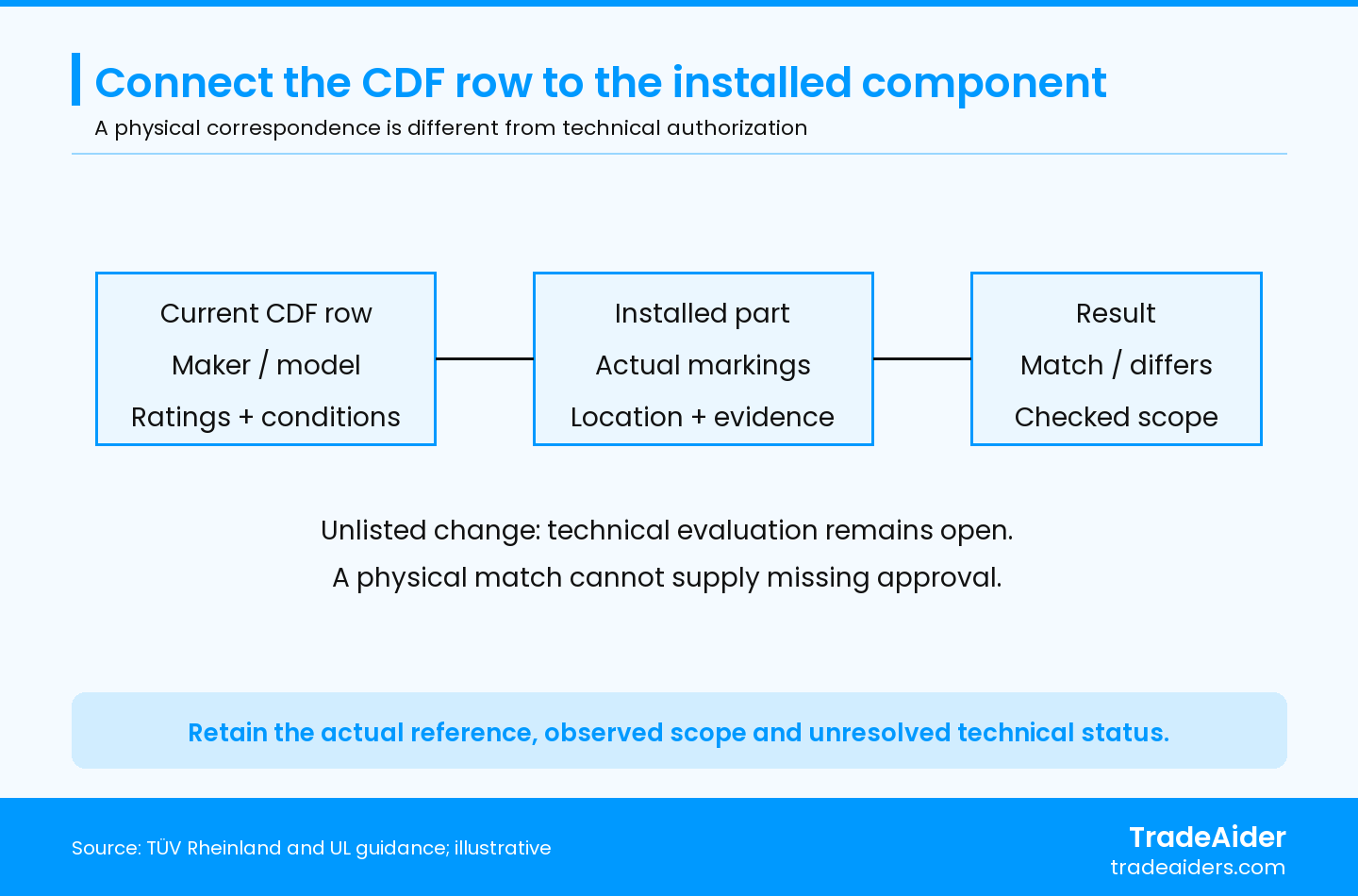
Illustrative comparison relationship. Read the current CDF row and conditions against the installed part. The resulting observation covers the scope checked; it cannot approve an unlisted component change.
State the appliances selected and the component comparison performed. Ordinary workmanship sampling does not automatically define how many units need internal access or which construction variants need checking. Discuss the Acceptable Quality Limit, or AQL, plan using the AQL sampling calculator, then separately agree component access and coverage. A sample observation does not establish every installed part across an unexamined batch.
Check ratings together with their conditions of use
Compare ratings with their documented meaning and conditions, rather than deciding from a single number on the part. Preserve the units, applicable load or use category, temperature qualification and any file notes relevant to that component. Ask the responsible technical reviewer to resolve unclear classifications. A buyer should not invent an engineering acceptance limit merely to turn an ambiguous comparison into a pass.
UL Solutions explains that Recognized Components are evaluated under conditions of acceptability, which can concern the housing, wiring or temperature limitations in the final product. Component recognition is not certification of a complete standalone product. An equal printed voltage or current rating does not, by itself, establish that an alternative satisfies the documented conditions of use.
For example, a replacement switch may carry the same printed voltage and current as the listed switch while having a different complete model or documented application. Record the difference and obtain the applicable technical decision. A higher printed rating is also insufficient on its own: it does not answer whether the alternative’s construction, installation and other required characteristics satisfy the approved appliance configuration.
Where the released construction file expressly lists alternative components, identify the exact option being used and all conditions attached to it. Confirm that the option applies to this appliance variant and installation. An approved alternative need not be treated as an entirely new, unlisted proposal, but its presence elsewhere in a supplier catalogue or in another product’s report does not establish that permission here.
Keep functional observations separate. An appliance that switches on or completes a normal operating cycle has demonstrated the observed function under that setup. It has not thereby established that an altered safety-critical component is acceptable. Where the technical evaluation requires testing or updated records, obtain those outputs through the responsible review route and retain their actual coverage.
For a finished order, discuss the component comparison within TradeAider’s Pre-Shipment Inspection services. Its stated pre-shipment inspection, or PSI, timing is 100% of the order complete and at least 80% packed. Confirm access and the specific construction checks in advance; a routine final inspection does not automatically include opening appliances or approving changed parts.
Record the technical evaluation status of component changes
Use separate fields for the technical evaluation and the physical comparison. A proposed substitution may already be fitted, or it may exist only in a supplier’s request. Record which is true. Then identify the file owner and the authorized reviewer or issuing body whose decision is needed under the actual scheme and construction requirements.
UL Solutions’ process guide describes technical review and a certification decision before the requested deliverable is provided. It also directs customers to review the report when the product changes and contact the project handler where an update is needed or the requirements are unclear. A proposed component list and a final released record therefore need distinct statuses.
Useful working statuses include proposed, under technical review, accepted within a documented scope, not accepted, and awaiting physical confirmation. These are recommended reporting labels, not official scheme terminology. Use the actual reviewer’s wording when recording an outcome. Do not change “submitted” to “approved,” or interpret an email acknowledging receipt as permission to use the alternate.
Copy this component change and evaluation status record for each unresolved difference. Keep the decision reference and physical follow-up together so the recipient can see what remains open.
| Record item | Entry to retain | Question it resolves |
|---|---|---|
| Controlling construction | File, current pages, appliance variant and component row. | Which approved reference is being compared? |
| Proposed / observed part | Actual maker, full model, ratings, location and evidence. | Is this a proposal, or already installed? |
| Technical status | Reviewer, request reference, pending items and documented outcome. | Has the responsible party decided, and on what basis? |
| Conditions and scope | Permitted use, effective reference and affected production range. | Where does that outcome apply? |
| Production handling | Identified stock, assembly batches and finished units; current disposition. | Which goods remain affected or uncertain? |
| Physical confirmation | Agreed recheck, observed identifiers, result and remaining gaps. | Does actual production follow the applicable outcome? |
| Owner and recipient | Action owner, follow-up date and actual report recipient. | Who closes the open item and receives the decision evidence? |
Preserve affected component stock and finished-production identities while the question is open. If mixed use prevents the factory from distinguishing the changed range, record that uncertainty rather than assigning it only to the inspected sample. Let the responsible parties establish the required evaluation, testing, record revision and production disposition. Neither the factory’s commercial assurance nor an ordinary inspector’s visual match supplies that decision.
Work through an unlisted protective-control replacement
Illustrative scenario: An appliance’s current construction record lists a protective control from Maker A, Model A, with specified ratings and an installation note. During an agreed internal comparison, the inspector finds Maker B, Model B. Its printed voltage and current appear the same, and the appliance operates normally. The alternative is not listed in the controlling record, and the factory has only a change request awaiting review. These are hypothetical identities and observations, not a customer case or a safety test result.
When an observed protective-control model is absent from the controlling construction record, record the actual identity and affected production, and refer the change to the responsible technical owner. Keep the technical evaluation open until its documented outcome and applicable scope are available. Physical rechecking then establishes whether the identified production follows that outcome; it does not supply the missing technical approval.
The report first preserves the current row, the installed control’s full markings, its location and the inspected appliance identity. The factory traces when Maker B entered assembly and identifies the associated component stock and finished units. If that connection is incomplete, the report states the uncertain range. The buyer keeps the affected goods under the agreed disposition while the responsible technical owner obtains the required review.
Suppose the authorized review subsequently permits Maker B only with a revised mounting arrangement and issues the applicable updated construction reference. That conditional outcome does not describe the appliances still assembled under the old arrangement. The factory must implement the permitted construction for the affected scope and retain the associated production records. If instead the alternate is refused, the production disposition must follow that outcome; the old change request does not become an exception.
The physical follow-up compares the identified appliances against the applicable released reference: correct control identity, documented mounting arrangement and the agreed evidence linking the work to the affected production. Report the units and features actually checked, together with any remaining gaps. Technical acceptance of a proposed construction and confirmation that production follows it are separate evidence steps. A successful limited recheck cannot establish the construction of unidentified or unexamined goods.
Prepare a CDF comparison brief and an actionable report
Send the comparison brief early enough to resolve missing references and access needs before the visit. Begin an inquiry with the available appliance, order, destination, factory and timing information. Before execution, align the current construction file, covered variants, component entries, known changes and agreed safe comparison methods. Identify who can answer file-interpretation questions while the inspection is in progress.
A useful CDF comparison report retains the controlling document reference, row or item, actual component identity, observations, production scope and unresolved technical status. Name the responsible owner and actual report recipient. Report a match only for the references and physical scope actually checked; unreadable marks, inaccessible components and pending evaluations remain explicit limitations.
Confirm the report’s final user. The importer’s quality team, a certification file owner and a retailer may need different references or supporting records. Agree the required language, format and acceptance requirements with that actual recipient. A technically useful observation can still be difficult to act on if the recipient cannot locate the cited row, identify the appliance or distinguish an open review from a completed one.
Ask for a concise findings record with linked photographs and document references, the physical scope checked, differences and access limitations. For each open item, retain the next action and owner. Where separate laboratory work or certification review is needed, identify the required route without presenting the inspection report as a substitute for it. The buyer’s production or shipment decision should follow the applicable requirements and resolved evidence, rather than the presence of a generic pass label.
To agree a practical comparison, share the available product and production information, relevant current CDF pages, known component changes and intended report recipient, then contact the TradeAider team. Confirm the feasible observations, safe access, supporting records and report requirements before execution.
Frequently Asked Questions
What if the factory will not share the complete construction file?
Arrange controlled access to the relevant current pages with the file owner. Agree whether the reviewer can inspect the file directly, work under confidentiality arrangements or receive an authorized extract. The access method should preserve the model, revision and conditions needed for the comparison. An excerpt without that context cannot support a claim that the complete construction file matches production.
Can supplier packaging identify an unmarked component?
It can support identification only when the packaging is traceably connected to the installed part. Record the link through the actual component lot and assembly records, and ask the responsible owner to confirm an acceptable identification route. A loose carton, spare part or catalogue does not establish what was fitted. Keep the remaining gap visible if the installed identity cannot be established.
Does approval at one factory cover another production site?
Confirm the permitted manufacturing locations and applicable file scope with the responsible owner. Record the actual production site in the comparison brief. Common ownership, a transferred assembly line or a similar appliance model does not establish that another site is included in the relevant certification arrangements. Resolve the location question before relying on a file from a different factory.
مقالات ذات صلة


نمِ عملك مع خدمة TradeAider
انقر على الزر أدناه للدخول مباشرة إلى نظام خدمة TradeAider. الخطوات البسيطة من الحجز والدفع إلى تلقي التقارير سهلة التشغيل.