
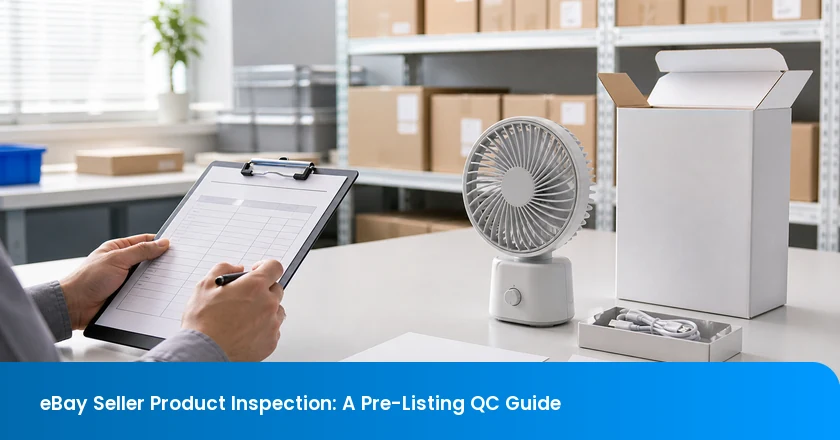
An eBay seller product inspection should not chase a vague “pass”; it should prove that the current physical lot can support the exact identity, condition, feature, included-item, and packaging statements a buyer will see before inventory goes live. That changes the brief. Instead of asking only whether units look acceptable, the seller asks which listing promise each check can prove, which SKU or carton range it covers, and what must happen if the proof is missing. The result is a release decision for stock—not an assertion that eBay has approved the listing.
What Must Match Before You Activate an eBay Listing?
- The listing and the lot must name the same item. A supplier product name is not enough when variations, identifiers, colourways, or bundle contents differ.
- Condition, function, and included items need separate proof. A clean-looking unit can still fail the offer if the promised cable, adapter, feature, or warning is absent.
- Inspection scope should follow the reach of the claim. A single missing promise repeated across a carton segment is a lot-release issue, not a minor note.
- Keep one listing-release file. The draft listing, inspection result, lot scope, photographs, corrections, and release owner should point to the same sellable configuration.
The eBay Boundary: Inspection Supports a Listing; It Does Not Approve It
Product evidence can support a listing; it cannot approve it. An inspection can establish only the facts it was asked and able to observe: for example, a stated SKU, a function test, an accessory count, or the condition of the sampled units. It cannot decide every rule that applies in every destination or transfer the seller’s responsibility for what appears on the marketplace. eBay’s selling-policy overview directs sellers to the detailed rules that apply to their listings. Treat that policy review as a seller task, then use inspection to make the physical evidence behind the draft more reliable.
The practical starting point is accuracy. Required item specifics must be accurate and complete. eBay’s item description policy also says product details must match the exact item when catalogue information is used. An inspection brief should therefore not say “check quality” and stop there. It should list the particular item specifics, offer claims, and package contents that would mislead a buyer if they were wrong. To turn those approved requirements into a supplier-ready brief, start with TradeAider’s inspection standard resource that can name the checkpoint, observation method, and release action.
Start With the Listing, Not a Generic Checklist
Start inspection with the facts that would change a buyer’s decision. Pull those buyer-facing facts from the draft listing before the supplier is briefed. eBay’s listing guidance tells sellers to state key selling points, exactly what is included, and accurate condition. Translate those promises into a short evidence request: the stated model or variation; the chosen condition; the feature that makes the product useful; the accessory list; and the retail pack presentation. That sequence prevents a report from spending pages on generic workmanship while never checking the one cable, size, voltage, or bundle element that makes the offer true.
Name the product precisely enough to separate it from close variants. A GTIN identifies a trade item. As GS1 explains, it is a global product identifier that can distinguish one sellable product from another. The supplier’s internal SKU may also be useful, but record the exact variation, colour, plug, capacity, or bundle alongside it. The inspection label, retail label, carton mark, and listing draft do not need identical formatting. They do need a clear route back to the same product, so a close-looking substitute does not silently inherit another listing’s description.
Test What the Listing Asks the Buyer to Believe
A condition label needs its own evidence, not a generic visual pass. eBay’s condition guidance uses category-specific descriptions, because “new,” “open box,” “used,” and similar labels create different expectations. The brief should state what the selected condition means for this item: unopened packaging, no wear, visible imperfections, working status, or the missing original material that must be disclosed. A sampled visual check can then confirm a defined observation rather than leaving the inspector to guess what “acceptable” means.
eBay's product safety policy prohibits recalled, unsafe, and non-compliant products and directs sellers to review relevant requirements before listing. Inspection evidence does not replace the seller’s safety and compliance decision. The policy can guide the marketplace review, while inspection can verify agreed observable details—such as a warning label being present, a supplied document being attached, or a charger marking matching the brief. When a safety document, warning, market-specific label, or recall check matters, assign an owner for that review in the listing-release file rather than describing the inspection report as a compliance certificate.
Match Four Product Facts Before Inventory Goes Live
Every buyer-facing fact needs a physical proof, a batch scope, and a hold action. A usable pre-listing check joins four facts: identity, condition, function, and pack-out. For each fact, name the observation, the SKU or lot it represents, and the response if it fails. This is a seller framework, not an eBay form or a universal sample plan. Its value is that it exposes a broken connection early: a feature claim with no recorded test, a bundle with no accessory count, or a condition label with no matching observation.
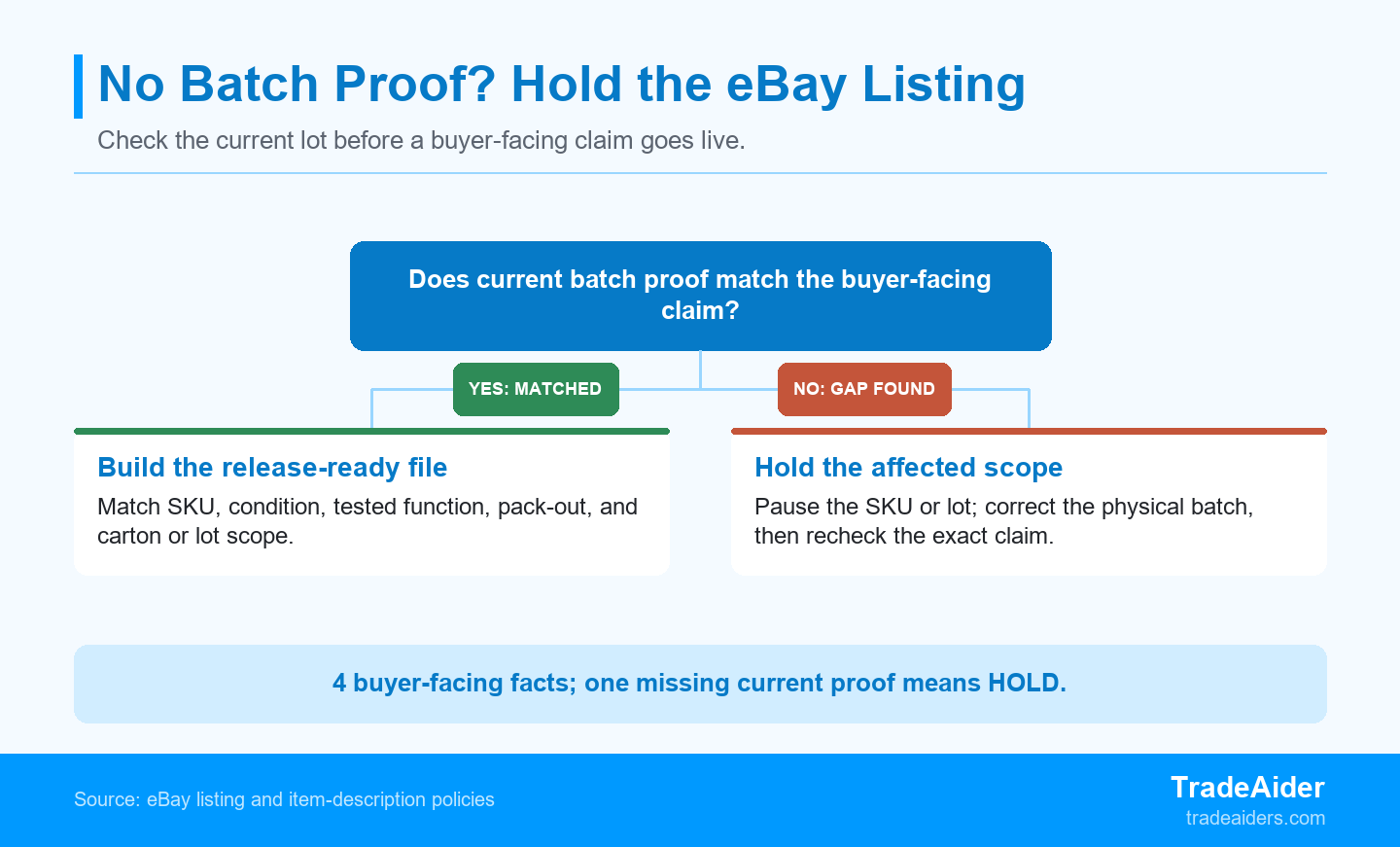
A listing can move toward activation only when current batch evidence supports its buyer-facing claim; otherwise hold the affected scope.
| Listing fact | Physical proof to request | Scope to record | Hold trigger |
|---|---|---|---|
| Identity | Unit label, model, variation, and carton mark | SKU, colour/plug/capacity, carton range | The checked item cannot be tied to the listed variation |
| Condition | Visual record against the selected condition statement | Sample method and observed imperfections | Actual state conflicts with the stated condition |
| Function | Defined operating test for the buyer-facing feature | Test method, sample scope, and result | A promised function is untested or fails |
| In the box | Accessory count, retail pack, label, and packaging check | Sellable unit and affected carton range | Any promised item or pack configuration is absent |
Do not collapse these rows into a single “quality passed” note. The proof for a rechargeable device’s stated run-time feature is different from the proof that the correct plug is in the carton. The proof for a “new” condition is different from the proof that a warranty card or charging lead is included. When one row has no matching proof, hold only the identified SKU or lot where traceability allows; do not quietly rewrite the listing around inventory that still lacks evidence.
Choose Inspection Depth From Return Exposure, Not Product Price
One unverified promise repeated across 300 cartons creates a 300-unit exposure count, not a projected return total. Inspection depth should follow the reach of an unproven promise, not product price alone. Under this illustrative calculation, a promised charging cable missing from 300 identifiable cartons affects 300 saleable units or packs. It simply shows how widely the unsupported claim is repeated. That matters because eBay’s Money Back Guarantee policy lists an item that does not match the listing among covered problems, subject to its terms. A large, repeated mismatch deserves more than a cosmetic note.
Repeated pack-out failures belong at an earlier control point, not only in a final report. Use the exposure count to choose the stage of control. A one-off packing slip can be found in a final check. A repeated wrong accessory, component, or label can spread through later production and needs an earlier decision. In that case, a during-production inspection is a more natural bridge: the buyer can test whether the supplier’s correction is being applied before the full finished lot and its retail cartons are complete. The question is where the evidence chain first breaks and where the supplier can still correct it.
Find the Claim That Fails the Whole Offer
Prioritize the claim that changes what the buyer believes they will receive. A tiny scratch on an inner tray may matter less than a missing adapter, an incorrect voltage, a non-working advertised mode, or a condition label that no longer fits the product. This is not a universal defect classification. It is a way to focus attention on the buyer’s decision. Put that claim first in the brief, define the observation method, and record the lot scope. If it fails, the seller knows whether to hold one variation, one carton segment, or the whole lot because traceability is missing.
Worked Scenario: The Product Looks Right but the Carton Is Incomplete
The scenario is illustrative; it does not describe an actual TradeAider inspection or eBay case. It shows why approved photos and an acceptable-looking product can still leave a listing unsupported when the current carton differs from the sample used to build the offer.
Hold an unsupported buyer-facing claim until the physical lot or documented correction supports it. The most useful hold is narrow and traceable: it isolates the known SKU or carton segment while the seller investigates, rather than assuming that a broad supplier statement settles the issue.
Recheck the Corrected Carton Before Release
Recheck the corrected carton against the precise buyer-facing claim before release. A seller is preparing a private-label rechargeable desk fan for an eBay listing after receiving a 1,200-unit lot in 300 cartons. The approved draft says that each sellable unit includes a USB-C charging cable and wrist lanyard. The fans look like the approved sample, and the team is about to activate inventory after its final product and packaging check.
A carton-opening check finds the fan and lanyard but no USB-C cable in the accessory tray. The latest 300-carton segment is sealed and carries the same SKU as the earlier sample configuration. Its outer carton mark and packing list do not identify the incomplete pack-out, so a warehouse team cannot distinguish a correct carton from an incomplete one just by reading the label.
The missing cable is not a minor presentation issue because it changes what the listing says is included. Changing the listing photo would not repair the stock already packed. The affected scope—here, the specific cartons or lot segment touched by the mismatch—is all 300 cartons until the supplier can prove otherwise. The seller holds the listing release for that segment, asks for a carton-range record, and prevents mixed repacking until the scope is known.
The supplier repacks the identified cartons, records the carton range and accessory count, and supplies updated pack-out photographs. The release loses one working day to repack and recheck; that is an illustrative operational trade-off, not a return-rate estimate. Before activation, the seller reopens selected corrected cartons and verifies the cable count, SKU label, listing wording, and supporting photos together. Only that documented corrected scope is released. The scenario does not determine eBay policy compliance, legal obligations, or a universal acceptance threshold.
Build a Listing-Release File the Supplier Can Hand Over
TradeAider publishes an e-commerce quality solutions page. A listing-release file turns observations into a repeatable decision. It can be short, but it should name the draft listing version, product identifier, lot or carton scope, inspection result, linked photos, correction status, and final owner. A seller who needs outside support for this e-commerce-specific handoff can review TradeAider’s e-commerce quality solutions after defining the precise product and pack-out evidence required. The service path is useful only when the brief already states what the listing must be able to prove.
| File item | What it should identify | Owner before release |
|---|---|---|
| Approved listing draft | Title, item specifics, stated condition, key feature, and what is included | Seller or listing manager |
| Product and lot record | SKU/variation, GTIN if used, carton range, and supplier batch reference | Supplier and quality owner |
| Inspection evidence | Method, sample scope, results, photos, and any unverified field | Inspection owner |
| Correction and release note | What changed, which cartons were rechecked, and who released the listed configuration | Release owner |
Before release, reconcile the file line by line. The listing manager confirms that the title, item specifics, condition wording, and included-item statement still describe the finished configuration. The supplier confirms the SKU, variation, carton range, and any corrected packing date. The inspection owner confirms what was sampled, what was observed, which photographs belong to that check, and what remains unverified. The release owner then makes the commercial decision: activate the documented configuration, hold a specific variation, or wait for correction. This sequence prevents a photo folder, a supplier declaration, and a report from being treated as interchangeable proof. It also leaves an audit trail when stock is later split between channels or repacked for a new offer.
TradeAider publishes a Pre-Shipment Inspection service page. If the order is already finished, share the approved listing draft, SKU or GTIN list, product specification, pack-out requirement, finished-lot date, and known risk claims. The resulting product and export-packing evidence can then be compared with the exact configuration that will go live. It remains a defined check, not an eBay approval or a promise that no buyer will ever request a return. When the file shows that a final lot needs independent product and packing evidence, arrange a pre-shipment inspection.
Frequently Asked Questions
Does an inspection make my eBay listing compliant?
No, an inspection can test agreed product facts but it does not approve a listing or determine every applicable marketplace or legal requirement. It can show whether the defined product, pack-out, condition, or function matches the brief. The seller still owns the listing text, item specifics, safety information, recall review, destination requirements, and the decision to activate inventory. Use the report as evidence in that decision, not as a platform certificate.
Should I inspect every SKU before listing it?
Not always, but every SKU needs a documented decision about which listing-critical facts require physical proof before stock is activated. Start with variations that differ in function, capacity, plug, colour, bundle contents, or condition. A close-looking variation can still require its own evidence if it changes what the buyer receives. Record why a variation shares evidence with another SKU or why it needs a separate check; do not assume a supplier family name makes all versions equivalent.
Can supplier photos prove what buyers will receive?
No, supplier photos can support a brief, but they do not prove that the current production lot, carton contents, and included accessories match the images. Ask what product and batch the photographs represent, whether the shown configuration was an approved sample or current production, and whether the pictured accessories were counted in the latest pack-out. Photos become stronger evidence when they are linked to an identified SKU, carton range, observation date, and recheck result.
What should trigger a hold before inventory goes live?
Hold the affected SKU or lot when a buyer-facing identity, condition, feature, safety, or included-item claim lacks matching physical evidence or a documented correction. First contain the scope you can identify, such as one variation or a named carton range. Then correct the product, packaging, label, or listing as needed and recheck the exact promise that failed. Expand the hold only when the supplier cannot trace which stock shares the mismatch.

Articles Connexes

Développez votre entreprise avec le Service TradeAider
Cliquez sur le bouton ci-dessous pour accéder directement au Système de Service TradeAider. Les étapes simples de la réservation et du paiement à la réception des rapports sont faciles à utiliser.