
An AQL inspection report is a decision document that connects the inspected lot, sampling plan, defect classifications, evidence photos, and final conclusion into one release recommendation. Importers should read it in sequence, not jump straight to the pass or fail line.
An AQL report can feel technical the first time you read one. It may include lot size, sample size, inspection level, critical defects, major defects, minor defects, acceptance numbers, rejection numbers, measurement records, photos, packaging checks, and an overall conclusion. The report is easier to use when you treat it as a story about one shipment.
The story starts with identity: which order was inspected, where, when, and at what packed status. It then moves to sampling: how many units were checked and which defect limits apply. It continues through evidence: what defects were found, how severe they were, where they appeared, and whether photos support the findings. Only after those steps should the buyer read the final conclusion.
This guide is written for importers sourcing from China who need to decide whether to approve shipment, request rework, ask for reinspection, negotiate with the supplier, or reject the lot.
The Direct Answer
Read an AQL report in this order: identity, lot status, sample size, defect limits, defect evidence, checkpoint results, and conclusion.
TradeAider's AQL calculator and AQL guidance explain that Acceptable Quality Limit is used to decide the maximum acceptable number of defective items in a sample batch, with different treatment for critical, major, and minor defects. That is the foundation of the report's pass or fail logic.
AQL is not a promise that the shipment has zero defects. It is a standardized sampling method that helps decide whether a finished lot is acceptable under the buyer's agreed defect tolerances. The report should therefore answer three questions: Was the right lot inspected? Was the sampling plan applied correctly? Do the findings support the release decision?
The final conclusion matters, but it should not be read alone. A report can technically pass while still showing issues the buyer wants corrected. A report can fail because of one critical defect even if most units look fine. A smart importer reads the details before deciding what to tell the supplier.
AQL Report Anatomy
Every section of the report should support one part of the release decision.
| Report Section | What To Look For | Why It Matters |
|---|---|---|
| Report identity | PO number, supplier, factory, SKU, inspection date | Prevents mixing one order, factory, or revision with another |
| Lot status | Total quantity, packed quantity, carton count | Shows whether the inspected goods represent the shipment |
| Sampling plan | Inspection level, sample size, AQL limits | Explains how many units were checked and how many defects are allowed |
| Defect classes | Critical, major, minor findings | Connects defect severity to accept or reject rules |
| Checkpoint results | Quantity, packaging, workmanship, function, measurements | Shows where the order passed, failed, or needs review |
| Photo evidence | Defect closeups, labels, cartons, measured items | Lets the buyer verify the conclusion visually |
| Final conclusion | Pass, fail, pending, or hold recommendation | Turns the facts into a release decision |
The report is most useful when these sections agree with each other. For example, the sample size should match the lot size and inspection level. Defect photos should match the defect descriptions. The conclusion should match the defect count and AQL limits. If one part feels inconsistent, ask before approving shipment.
Buyers should also compare the report against their own purchase order and product specification. A report can only evaluate what was instructed and what was visible or testable on site. If the buyer forgot to provide a special requirement, the report may not cover it.
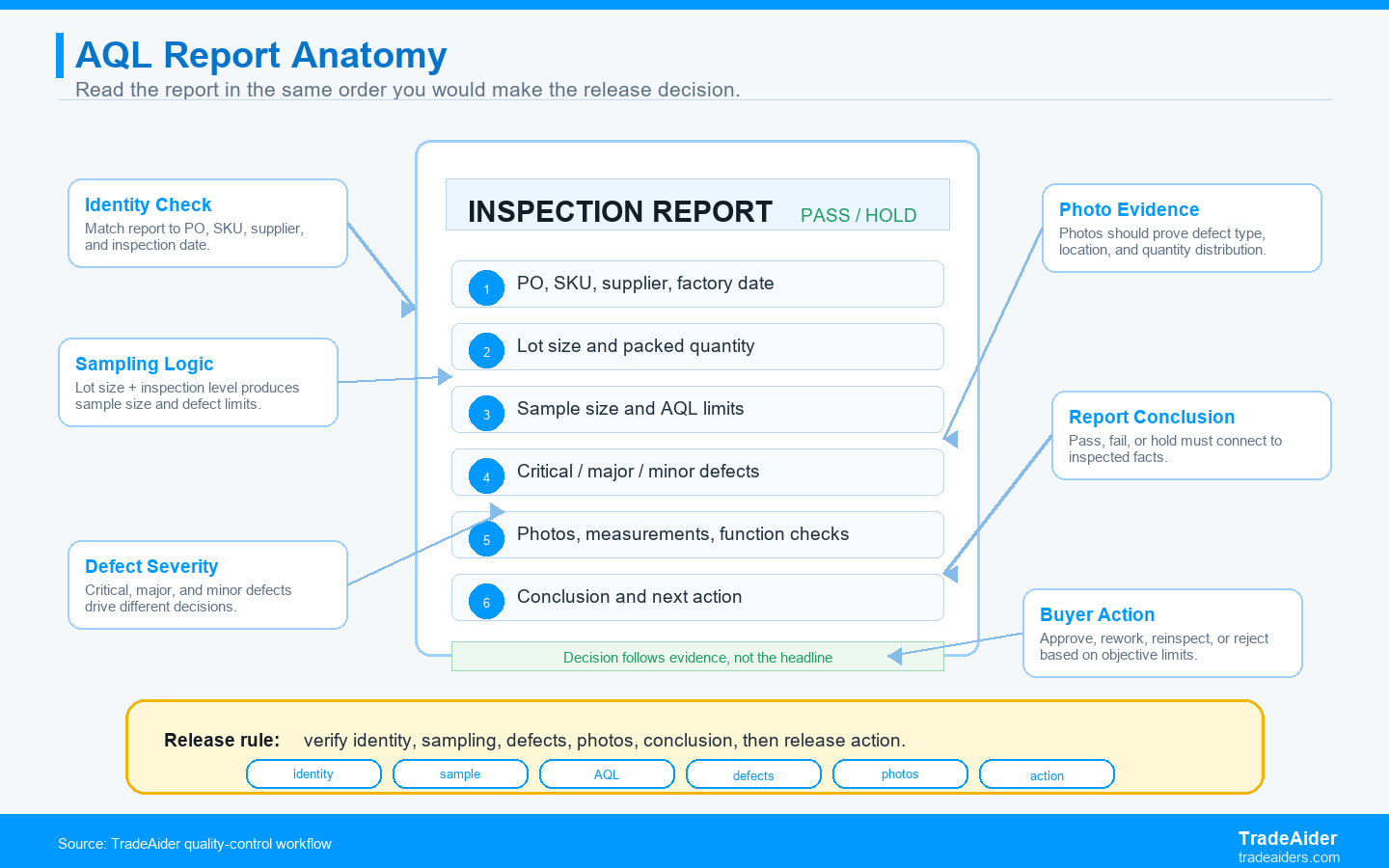
An AQL report should be read as a chain of evidence, not as a single pass/fail label.
Step 1: Confirm The Report Identity
The first job is to make sure the report belongs to the exact shipment you are deciding on.
Check the supplier name, factory address, inspection date, purchase order, SKU list, product description, model number, color, size, variant, order quantity, and destination or packaging version. This step sounds basic, but it prevents serious errors when buyers have multiple suppliers, repeat orders, split shipments, or similar-looking SKUs.
Also check who attended the inspection and whether the factory presented the correct lot. If the factory showed only a partial lot, unpacked goods, old stock, or a mixed production area, the report should make that clear. A good report is not only about defects. It is also about whether the inspection conditions were valid.
If the identity section is wrong, stop reading and request clarification. A perfect defect table does not help if the report is attached to the wrong shipment or an outdated packaging version.
Step 2: Check Lot Size, Packed Status, And Sample Size
The sampling plan is meaningful only when the inspected lot represents the shipment.
Look for total order quantity, quantity finished, quantity packed, carton count, and the percentage packed at inspection time. For a pre-shipment inspection, the lot should be finished and sufficiently packed to represent what will ship. If too little is packed, packaging, labeling, carton marks, and assortment checks may be incomplete.
Next, read the inspection level and sample size. General Inspection Level II is common for many consumer goods, but the right level depends on product risk, buyer requirements, and order context. The report should show how many units were sampled. If the sample size feels too small for the buyer's risk, that is a scope decision to discuss before the next inspection.
The TradeAider AQL guidance explains that sample size is determined from lot size and inspection level, and then defect thresholds are applied by category. That is why lot size errors are not minor clerical issues. They can change the sample size and decision threshold.
Step 3: Separate Critical, Major, And Minor Defects
Defect severity matters more than the total number of defect photos.
A critical defect is a safety, legal, or severe usability problem that the buyer normally cannot accept. A major defect is likely to affect saleability, function, durability, or customer satisfaction. A minor defect is a smaller deviation that may not prevent sale but still matters when it exceeds the agreed limit.
Do not combine all defects into one emotional reaction. Ten minor cosmetic marks may be less serious than one critical safety issue. Three major functional failures may matter more than twenty small package scuffs, depending on the product. The report should classify defects clearly enough for the buyer to decide what must be corrected.
If a defect classification seems wrong, ask for clarification. For example, a loose screw on a decorative accessory may be minor, but a loose screw inside an electrical product or child-use product may be major or critical. Context matters, and the buyer's written standard should guide classification.
Step 4: Match Defects Against The Product Specification
An AQL report is strongest when every defect is judged against a written requirement.
Read the defect descriptions next to your approved sample, CAD drawing, packaging artwork, measurement tolerance, material requirement, color standard, barcode file, label file, manual, and purchase order. A defect is easier to dispute or correct when the report can point to a specific requirement.
Vague standards create vague outcomes. If the buyer says "good quality" but does not define acceptable scratches, color variance, carton compression, label position, or function steps, the inspector must rely on general judgment. AQL is much more effective when the buyer provides measurable criteria.
For future inspections, build a small defect library. Keep photos of unacceptable scratches, acceptable minor marks, wrong label placement, approved packaging, and required function test steps. That library makes each report faster to interpret and easier to discuss with the supplier.
Step 5: Read The Photos Like Evidence
Photos should prove what happened, not decorate the report.
Good report photos show the inspected product, cartons, labels, accessories, measurements, function tests, defect closeups, and sometimes the wider context of the selected samples. A closeup alone may not be enough. The buyer may need to see whether the defect appears on one variant, one carton, one production date, or across the sampled lot.
Look for photo-to-description consistency. If the defect table says "wrong logo color," the photo should show the actual logo and, ideally, the expected reference. If the report says "carton mark missing," the photo should show the carton panel. If the report says "function failure," the photo or video should show the test condition where possible.
Photos are especially valuable for supplier negotiations. They reduce arguments about wording and give the factory a practical target for correction. If the supplier says the issue is acceptable, the buyer can use the photos to decide whether that claim matches brand, retailer, and customer expectations.
Step 6: Interpret Pass, Fail, Or Hold Correctly
The conclusion should trigger a buyer action, not end the conversation automatically.
A pass result usually means the sampled lot is within the agreed limits. The buyer may still request small corrections, better packing, replacement of a few defective units, or written confirmation before shipment. A pass is not a reason to ignore every detail.
A fail result means the sampled defects exceeded the acceptance limits or a serious issue was found. The buyer should decide whether to reject the lot, request rework, ask for sorting, negotiate a correction plan, or reinspect after correction. The report should help the buyer make that decision with evidence.
A hold or pending result can happen when information is missing, a special test is incomplete, the buyer must review photos, or the inspection condition is not representative. Do not treat pending as approval. Treat it as a request for a specific next action.
Common Reading Mistakes Importers Should Avoid
Most AQL report mistakes happen when buyers read too fast or provide unclear standards.
- Reading only the conclusion and ignoring defect distribution.
- Assuming AQL means every unit was checked.
- Ignoring packed status and lot representation.
- Treating minor defects and critical defects as the same type of problem.
- Approving shipment before the supplier confirms corrective action.
- Sending vague inspection criteria and then expecting precise judgment.
The best importer habit is to review the report while the goods are still at the factory. That gives the buyer time to ask for clarification, additional photos, supervised correction, or reinspection before final release.
SPAR Scenario: Reading The Report Changed The Decision
The report headline said fail, but the details showed a practical correction path.
Situation: A Canadian importer ordered 2,400 desk lamps from a Shenzhen supplier. The buyer received an AQL report showing a failed result under major defects.
Problem: The buyer first considered rejecting the entire shipment. After reading the defect table, the team saw that most major defects came from one accessory bag missing a printed instruction insert, while function and electrical operation checks were acceptable within the inspected scope.
Action: The buyer asked the supplier to open affected cartons, insert the missing sheet, and provide correction photos. TradeAider then arranged reinspection focused on carton selection, instruction insert presence, label version, and sample function retest.
Result: The shipment passed reinspection and shipped with a short delay. The buyer did not blindly approve a failed report, but also did not overreact to a correctable packaging issue.
Action Card: AQL Report Review Checklist
Approve shipment only after the report facts support the decision you are about to make.
- Match the report identity to the PO, SKU, supplier, factory, and date.
- Check whether the inspected lot was complete and sufficiently packed.
- Confirm sample size, inspection level, and AQL limits.
- Read critical, major, and minor defects separately.
- Compare photos and measurements against the approved specification.
- Request rework and reinspection when failed findings require verified correction.
If you have an inspection report and are unsure how to interpret it, send TradeAider the report, PO, product specification, and approved sample references. The next step is to ask TradeAider to review the AQL findings before shipment release.
Frequently Asked Questions
Does an AQL pass mean every unit is defect-free?
No. An AQL pass means the sampled lot is within the agreed acceptance limits; it does not mean every unit in the shipment was inspected or guaranteed defect-free.
What should I read first in an AQL report?
Read the report identity and lot status first, then sample size, defect limits, defect evidence, and final conclusion.
What is the difference between major and minor defects?
Major defects affect function, saleability, durability, or customer satisfaction more seriously, while minor defects are smaller deviations that may still be acceptable if they stay within the agreed limit.
Should I ship after a failed AQL report?
A failed AQL report should trigger hold, correction, negotiation, or reinspection before shipment; shipping without resolving the issue moves the risk downstream.
Related Articles

Grow your business with TradeAider Service
Click the button below to directly enter the TradeAider Service System. The simple steps from booking and payment to receiving reports are easy to operate.