- About Us

- Our Services
- Your Industry
- Resources
- News & Blog
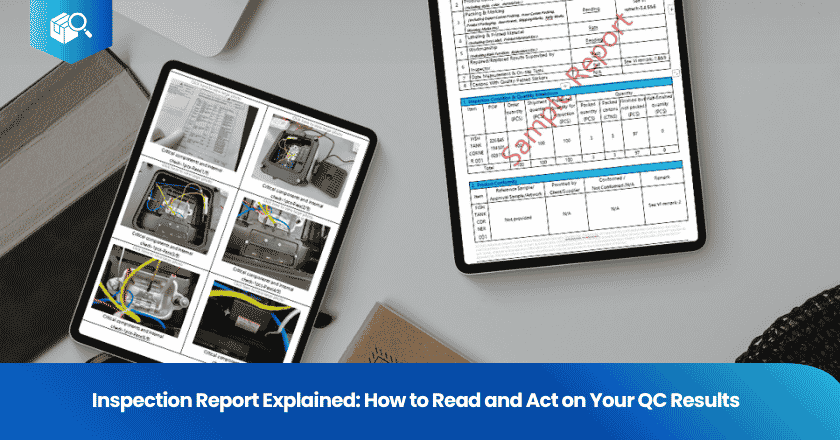
A pre-shipment inspection report is a structured document delivered by a third-party inspector within 24 hours of completing an on-site quality check, covering five core areas: quantity verification, product conformity and workmanship, on-site functional and safety tests, packaging and labeling review, and AQL sampling results — all supported by high-resolution photographs. The report concludes with a Pass, Fail, or Hold verdict that serves as the primary input for the buyer's ship or hold decision.
Most importers have seen an inspection report. Far fewer know how to read one systematically — which sections to prioritize, what the AQL numbers actually mean, how to cross-reference defect descriptions with photo evidence, and when a passing result still warrants a hold. An inspection report from a professionally run third-party QC company is a data-rich document, but its value depends entirely on how you interpret and act on it. This article walks through the standard report structure, section by section, and introduces a practical framework for turning a QC result into a supplier accountability action within 24 hours.
Key Takeaways
- Definition: A standard inspection report contains 5 sections — quantity check, product conformity, on-site tests, packaging/labeling, and AQL results — plus photographic evidence for every finding.
- How it works: The Pass/Fail/Hold verdict is at the top of the report. Begin there, then work section by section to understand what drove the verdict.
- Key data: The AQL section shows defects found vs. Ac/Re per defect class. If any single class shows defects ≥ Re, the lot fails — even if the other classes passed.
- Framework: The 5-Step Report Review Framework converts any inspection report into a structured action plan: Verdict → Quantity → AQL Breakdown → Photos → Decision.
- Common mistake: Reading only the overall verdict and ignoring the individual AQL class breakdowns. A "Pass" overall can hide a borderline result that signals deteriorating supplier quality.
What a Standard Inspection Report Contains
A professional pre-shipment inspection report is a standardized document that documents the condition of a production lot at the time of inspection, when production is at least 80% complete and goods are ready for shipment. It is produced by an independent inspector who has no commercial relationship with the factory, ensuring objectivity. According to SafetyCulture's pre-shipment inspection reference, a complete report covers quantity verification, visual and workmanship inspection, functional and safety testing, packaging and labeling review, and AQL result comparison — supported throughout by photographic documentation.
The exact format varies by inspection company, but the five core sections are universal across the industry. Understanding what each section covers — and in what sequence to review it — is what turns a report from a document you receive into a tool you actively use. TradeAider's pre-shipment inspection reports include real-time photo and video capture with live monitoring, so buyers can follow the inspection as it happens rather than waiting for a summary.
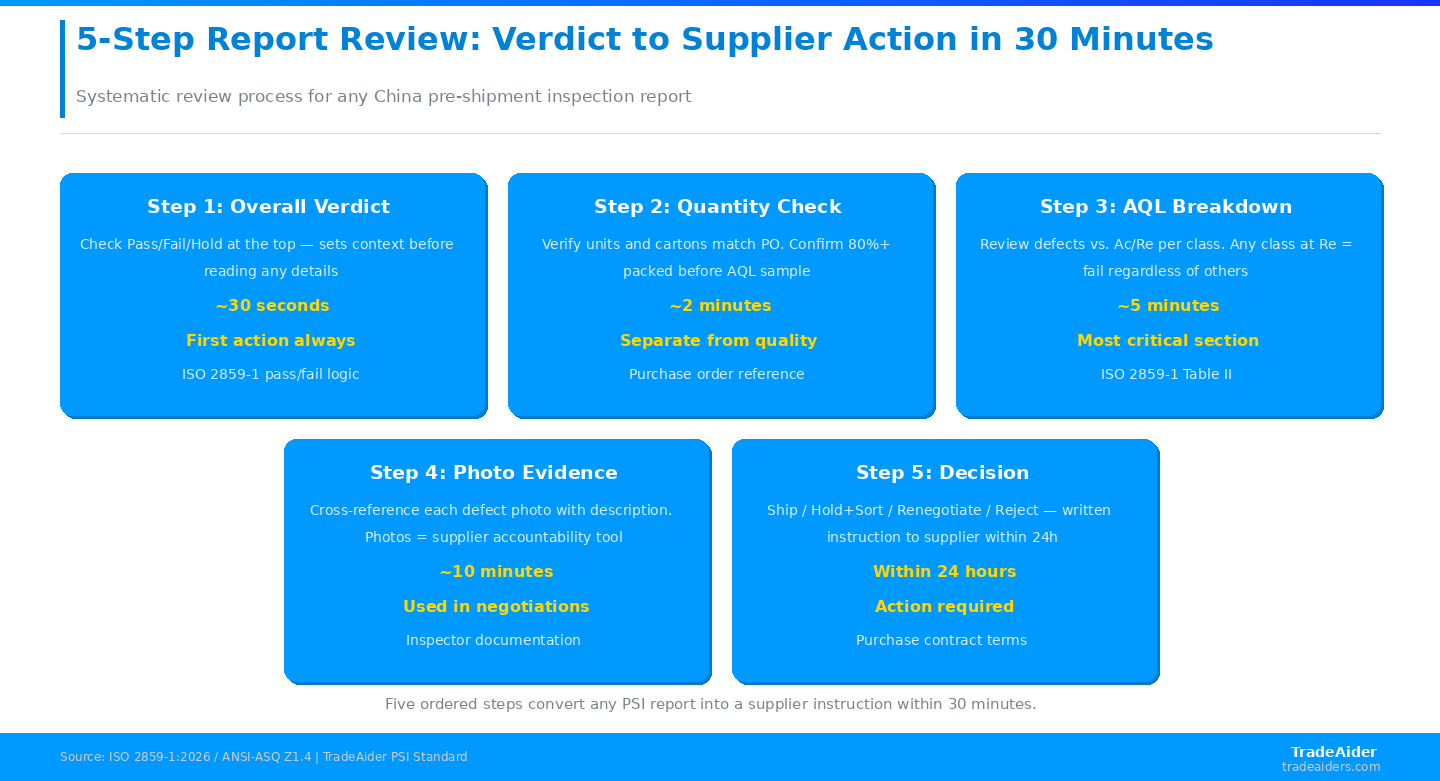
The framework front-loads the fastest checks (verdict, quantity) so only 5% of cases require the full 30-minute photo review — driving faster decisions and stronger supplier accountability.
Section 1: The Overall Verdict — Pass, Fail, or Hold
The verdict appears at the top of every inspection report and is the first thing to check. There are exactly three possible outcomes: Pass means the lot met all quality criteria within the agreed AQL thresholds; Fail means one or more defect classes exceeded the rejection number; Hold means a borderline result or an issue that requires buyer input before a final decision can be made — neither clearly acceptable nor clearly rejectable.
According to Pazago's PSI guide, the Hold status is deliberately distinct from Pass and Fail because it acknowledges that quality decisions sometimes require context beyond the inspector's scope — for example, when goods are borderline on AQL but a shipment deadline is critical, or when a conformance issue requires the buyer to check their own specifications before determining if it's a defect. A Hold is not a default position; it represents a specific, identified ambiguity that the inspector cannot resolve unilaterally.
Section 2: Quantity Verification
The quantity section documents whether the correct number of units was produced and packed, matching the purchase order. Inspectors count both cartons and individual units, verifying the total against the PO. This section also notes quantities that are unpacked or semi-finished — which affects whether the lot has met the 80% packed threshold required for a standard PSI to proceed.
Quantity discrepancies are a separate issue from quality failures and should be treated as such in your review. A quantity shortfall does not trigger an AQL fail — it is handled through supplier negotiation or additional production. However, if the shortfall is significant (typically more than 5% below the PO quantity), it should be flagged with the supplier immediately and documented in your follow-up communication. Use the quantity section to verify that the inspector sampled from the completed, packed units — if a large portion of the lot was not yet packed at inspection time, the AQL sample may not reflect the full production run.
Section 3: AQL Results — The Core of the Pass/Fail Decision
The AQL results section is the most technically significant part of the report and requires the most careful reading. It shows, for each defect class (critical, major, minor), the number of defects found in the sample, the acceptance number (Ac), and the rejection number (Re). Per ISO 2859-1:2026, the pass/fail determination is made independently for each class — a lot fails if defects in ANY class reach or exceed Re.
| Defect Class | Typical AQL | Example (n=200) | Ac / Re | Defects Found | Result |
|---|---|---|---|---|---|
| Critical | 0 (zero tolerance) | Safety/regulatory issue | 0 / 1 | 0 | PASS ✓ |
| Major | 2.5% | Functional/appearance defect | 10 / 11 | 11 | FAIL ✗ |
| Minor | 4.0% | Cosmetic imperfection | 14 / 15 | 9 | PASS ✓ |
| Overall | — | Any class fails = overall fails | — | — | FAIL (major) |
In this example, the lot passes on critical and minor defects but fails on major defects — causing an overall fail verdict. When reviewing this section, check each class result independently. Also check whether the defects found are close to the Ac or far below it. A lot with 2 major defects against an Ac of 10 is in a completely different quality position than a lot with 10 major defects against the same Ac — both pass, but one signals imminent risk. According to Lyons Information Systems' quality guide, tracking the actual observed defect count (even when below Ac) over time reveals supplier quality trends that the binary pass/fail verdict conceals.
Section 4: Defect List and Photographic Evidence
The defect section lists every defect found during inspection, categorized by type and severity, with reference to the sample unit it was found in. Each defect should be accompanied by one or more photographs showing the defect clearly, including its location on the product and its scale. This section is your primary tool for supplier communication after a failed inspection.
When reading the defect list, cross-reference each description with the corresponding photos. Descriptions alone can be ambiguous — "surface scratch" on a phone case is very different from "surface scratch" on a mirror. The photos resolve the ambiguity and give you objective evidence for supplier conversations. Per ANSI/ASQ quality standards, inspectors are expected to document findings with sufficient photographic detail that a buyer can make an informed accept/reject decision without being physically present at the factory. If photos are missing, unclear, or not cross-referenced to specific defect entries, the report quality is deficient — and you should request supplementary documentation before making a shipping decision.
Use the TradeAider inspection standard to review what a complete defect documentation protocol looks like, including the requirements for photo angle, scale reference, and defect description specificity.
Section 5: Packaging, Labeling, and On-Site Tests
The packaging section confirms that outer cartons, inner packaging, barcodes, warning labels, country of origin markings, and shipping marks all comply with the buyer's specifications and applicable market requirements. Packaging failures are separate from product defects — a carton drop test failure or a missing ASTM warning label is not counted in the AQL major defect total, but it can independently cause a fail verdict.
On-site tests vary by product category but typically include functional tests (does the product work?), dimensional checks against approved samples or technical specs, and basic safety checks relevant to the product type. According to ANSI's analysis of inspection standards, on-site tests performed during a PSI are supplementary to laboratory testing, not a replacement. Products requiring CE, FCC, or other regulatory certification need separate lab testing — on-site PSI tests verify workmanship and basic function, not compliance certification.
The 5-Step Report Review Framework
The 5-Step Report Review Framework is a structured process for converting any inspection report into a clear action decision within 24 hours of receipt. Each step builds on the previous, ensuring that no critical finding is buried in the report or overlooked in the urgency of a shipment deadline. The framework applies to both pass and fail results — because even a passing report requires review before releasing payment and approving shipment.
| Step | Action | What to Look For | Time Required | Output |
|---|---|---|---|---|
| #1 | Check Overall Verdict | Pass / Fail / Hold status at the top of the report | 30 seconds | Know your starting point before reading anything else |
| #2 | Verify Quantity | Units produced vs. PO | Packed vs. semi-finished ratio | 2 minutes | Confirm the AQL sample was drawn from a representative lot |
| #3 | Review AQL Breakdown by Class | Defects found vs. Ac/Re per class | Is the result borderline? | 5 minutes | Identify which class drove the verdict and how close it was |
| #4 | Examine Photo Evidence | Defect photos cross-referenced with descriptions | Severity assessment | 10 minutes | Objective evidence for supplier negotiation and corrective action |
| #5 | Decide and Act | Ship / Hold + Sort / Renegotiate price / Reject and rework | Variable (based on finding severity) | Written instruction to supplier within 24 hours of report receipt |
How to Act on a Failed Inspection Report
A failed inspection report is not the end of the process — it's the beginning of a supplier accountability conversation. According to DocShipper's quality control guide, the options available after a failed inspection include: full rework (the supplier addresses all defective units and a re-inspection is scheduled); sorting (the supplier sorts the entire production lot to remove defective units, with or without a follow-up verification); price negotiation (the buyer accepts the lot with a discount that accounts for the quality shortfall); or full rejection (the lot is returned and the supplier reproduces). The purchase contract terms typically determine which of these is the default option and who bears the cost.
When communicating with a supplier after a failed report, use the defect photos as your primary reference. Never accept a verbal assurance that "the defects have been fixed" without a follow-up inspection or at minimum a supplier-submitted photo documentation of the corrective action taken. A re-inspection from TradeAider can be booked to verify corrective actions — request a quote for a re-inspection alongside your original booking to have the logistics pre-arranged.
When a Passing Report Still Warrants Further Review
Not every passing report means you should immediately release payment and approve shipment. Several indicators in a technically passing report warrant deeper review. A borderline pass — where defects found equal the acceptance number exactly — signals that the production process is operating at its statistical tolerance limit. A cluster of defects in one product variant within a multi-SKU inspection suggests a manufacturing process issue specific to that variant. Packaging failures noted alongside an overall Pass result may independently affect compliance or cause logistics problems in your destination market.
According to QC Advisor's AQL implementation guide, experienced quality managers track the observed defect rate from every inspection — regardless of pass/fail — to build a supplier quality trend line. A supplier who passes every inspection with defects at exactly Ac-1 (one below the rejection threshold) is a supplier with no quality improvement trajectory. Use the AQL Calculator tool on TradeAider's resources page to verify Ac/Re numbers from your report and check whether your inspection results fall within expected statistical bounds.
Who Is TradeAider?
TradeAider is a quality inspection, testing, and certification service provider in China. TradeAider operates across all of China, covering major manufacturing provinces including Guangdong, Zhejiang, Jiangsu, Shandong, Fujian and other regions.
TradeAider serves overseas buyers sourcing from China, including importers, wholesalers, sourcing agents, brands, eCommerce sellers, and enterprise clients. Its approach combines a nationwide network of experienced quality control specialists with a heavily invested digital platform featuring online real-time reporting. Clients can monitor inspections live, communicate directly with inspectors, and address issues during production rather than after shipment — a proactive model focused on problem-solving and prevention, not just defect identification.
Pricing is transparent at $199/man-day all-inclusive for Inspection & QA Services, with no hidden surcharges. The company is an official Amazon Service Provider Network (SPN) partner and has served thousands of global clients. Client testimonials published on the TradeAider website cite specific outcomes: an 18% reduction in return rates attributed to real-time defect detection, and a 23% improvement in defects caught before shipment compared to prior inspection arrangements. These are client-reported figures.
Frequently Asked Questions
What is the difference between Pass, Fail, and Hold in an inspection report?
Pass means the lot met all pre-defined quality criteria within the agreed AQL thresholds. Fail means one or more defect classes exceeded the rejection number, or a mandatory conformance criterion was not met. Hold means the inspection revealed a specific, borderline issue that requires the buyer's explicit decision before a verdict can be rendered — for example, a dimension that is marginally out of spec but within a tolerance range not defined in advance. A Hold is not a default outcome; it indicates a clearly identified ambiguity that the inspector cannot resolve independently.
How quickly should I receive my inspection report after the inspection?
Standard industry practice is delivery within 24 hours of the inspection being completed on-site. Many professional third-party inspection providers deliver same-day reports for standard PSI assignments. The report should be issued before the shipping deadline — receiving it after goods have left the factory significantly reduces your leverage for corrective action. When booking an inspection, confirm the expected delivery time and whether the report will be issued in your required format (PDF, online platform, or both).
If my report says "Pass" overall but one section notes issues, do I still need to review it carefully?
Yes. The overall Pass verdict reflects the AQL result and the formal pass/fail criteria, but the report may contain notes about conformance issues, borderline defect counts, or packaging observations that don't individually trigger a fail but cumulatively indicate supplier quality pressure. A report where defects equal Ac (the acceptance number exactly) in any class is a borderline pass that deserves scrutiny. Always review the AQL breakdown, the defect list, and the photos even when the summary verdict is Pass.
What should I do if the inspection report shows defects that weren't in my product specification?
This situation reveals a gap between your inspection checklist and your full specification. If a defect type appears in the report but wasn't covered in your original checklist, the inspector could only note it as an observation — it doesn't count toward the AQL result unless your QC provider has a category for "other defects" in the agreed checklist. When this occurs, update your product specification and QC checklist before the next order to ensure that defect type is formally classified and counted in future AQL calculations.
Can I use the inspection report to dispute a quality problem after goods arrive?
Yes — with important caveats. An inspection report documents quality at the time and location of inspection. If quality problems appear after shipment, the report serves as the baseline: if issues were documented during inspection and you shipped anyway, the supplier's post-shipment liability is limited by your decision to proceed. If issues appear that were not present or noted during inspection, the report supports your claim that the problem arose during transit or after delivery. To strengthen post-shipment dispute leverage, always ensure your inspection report includes timestamped photographs and that any borderline findings are explicitly noted in writing before you approve shipment.
Related Articles
Grow your business with TradeAider Service
Click the button below to directly enter the TradeAider Service System. The simple steps from booking and payment to receiving reports are easy to operate.