

Negative reviews and returns data can improve supplier QC when the seller translates customer complaints into factory-controllable defect categories, verifies the root cause with evidence, and updates the next inspection checklist. The goal is not to blame the factory for every complaint; it is to separate supplier defects from listing mismatch, fulfillment damage, customer misuse, and normal expectation gaps.
Amazon sellers often read reviews emotionally. A negative review can feel unfair, vague, or painful, especially after a launch. But reviews and returns data can become useful quality signals if the seller organizes them. The same complaint repeated across customers may point to a product, packaging, accessory, instruction, or supplier-process issue that inspection can catch next time.
The mistake is sending raw review screenshots to the supplier and asking for better quality. Factories need specific, physical requirements: which part failed, what defect was observed, how often it appeared, which SKU or batch it affected, what the next tolerance should be, and what inspection evidence will prove correction.
- Input data: negative reviews, return reasons, customer messages, product photos, and inspection reports.
- Root-cause split: supplier defect, listing mismatch, fulfillment damage, customer misuse, or expectation gap.
- QC output: updated spec, supplier corrective action, DPI trigger, PSI checklist, and reinspection rule.
- Decision rule: only factory-controllable causes belong in supplier QC actions.
The Direct Answer
Use negative reviews as signals, not proof; confirm patterns with returns data, defect photos, supplier records, and inspection evidence before changing QC rules.
Amazon has discussed Return Insights and returns processing fee thresholds for high-return products, which reinforces why sellers should monitor return reasons and not wait until a defect pattern damages economics. Source: Amazon Return Insights discussion.
Reviews are public and emotionally important, but they are not always technically precise. A customer saying cheap may mean weak material, poor finish, bad packaging, wrong expectation from listing photos, or simply a preference mismatch. Root cause analysis turns that language into testable categories.
A good process combines customer language with physical evidence. If customers say parts are missing, inspect accessory count and packing method. If customers say it broke, inspect material, assembly, drop protection, or function. If customers say it is smaller than expected, check measurement tolerance and listing clarity.
Review-To-QC Translation Matrix
The seller must translate customer wording into inspection language the supplier can act on.
| Customer Signal | Possible Root Cause | Factory-Controlled? | Next QC Action |
|---|---|---|---|
| Missing parts | Accessory count, loose bag, packing-line error | Usually yes | Add accessory count and sealed pack photo |
| Broke quickly | Weak material, assembly, adhesive, or use mismatch | Maybe | Test function, stress point, and material evidence |
| Wrong item / wrong color | SKU mix, label error, carton mix, variation mismatch | Usually yes | Add SKU, barcode, color, and carton checks |
| Looks cheap | Finish, packaging, listing expectation, or customer preference | Sometimes | Compare to approved sample and listing photos |
| Package damaged | Factory carton weakness, freight damage, or FBA handling | Maybe | Check carton strength and protection evidence |
| Does not match photo | Listing mismatch or production drift | Maybe | Compare product to listing, sample, and spec |
This matrix protects both sides. It prevents the seller from blaming the supplier for every complaint, and it prevents the supplier from dismissing real quality patterns as customer opinion. The next inspection checklist should change only when the cause is physical and controllable.
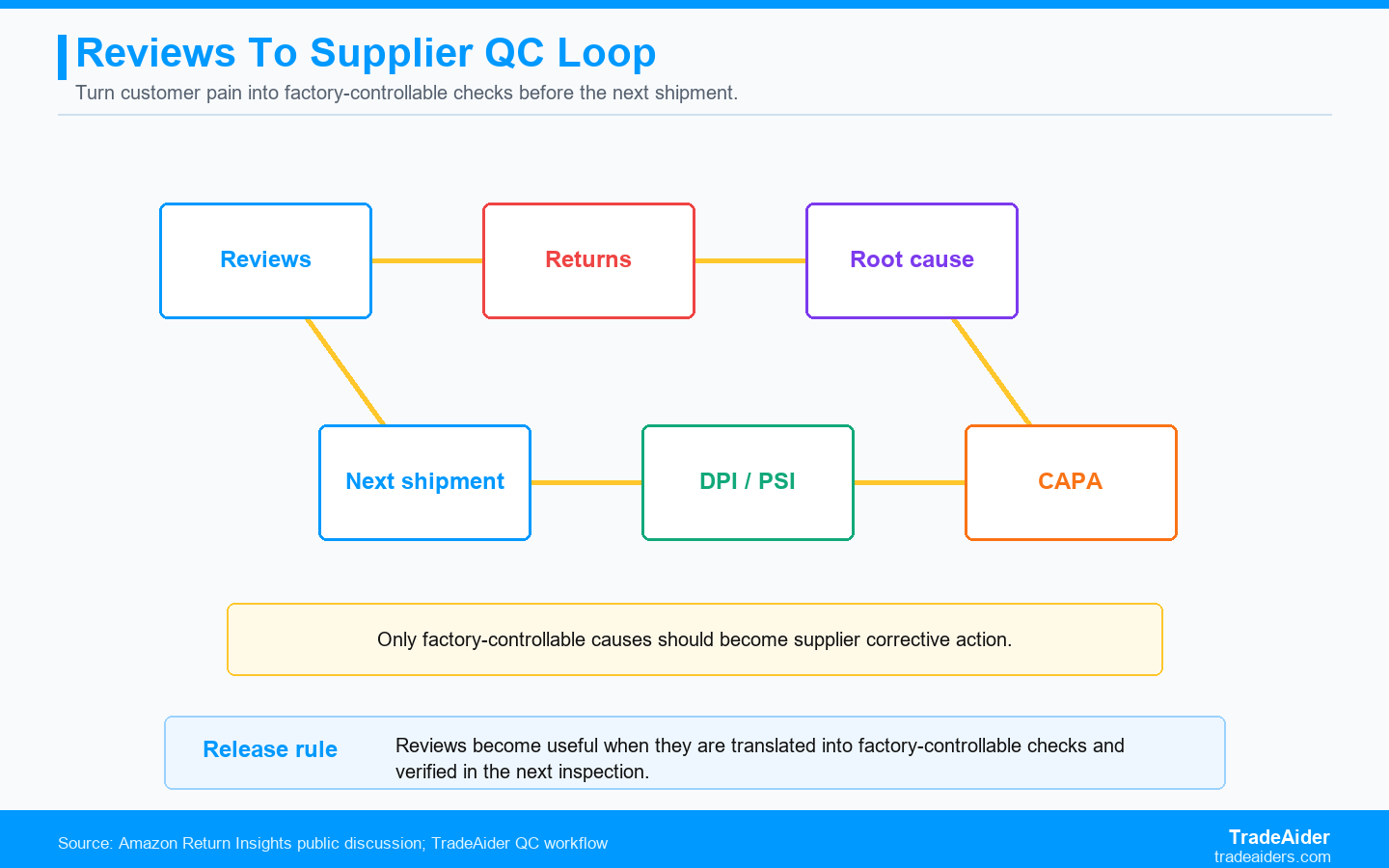
Reviews become useful when they are translated into factory-controllable checks and verified in the next inspection.
Step 1: Gather The Right Data
The seller should gather more than star ratings.
Useful data includes return reasons, negative review text, customer photos, support tickets, replacement requests, inspection reports, batch dates, SKU variation, shipment date, and supplier lot. A single review may be anecdotal. Ten similar returns from the same shipment may show a pattern. The seller should build a simple defect log by SKU and shipment.
The seller should also preserve the exact wording customers use. Customers often describe the symptom better than the technical cause. For example, falls apart may point to weak glue, loose screw, poor assembly, or unrealistic use. The wording is the starting point; inspection evidence identifies the cause.
Build A Review Defect Log
The defect log turns scattered feedback into a pattern the supplier can understand.
A practical review defect log does not need complex software. A spreadsheet can record ASIN, SKU, variation, order batch, shipment date, review quote, return reason, customer photo, suspected physical symptom, likely owner, and next QC action. The key is consistency. A seller should use the same category names every month so patterns become visible.
The defect log should separate emotional language from operational language. A customer may write terrible quality. The seller can translate that into finish scratch, weak hinge, missing screw, bad odor, wrong color, damaged carton, or listing expectation. This translation is what makes the data usable for factory communication.
| Log Field | Example Entry | Why It Helps | QC Output |
|---|---|---|---|
| Customer wording | Falls apart after one week | Preserves the symptom | Function and stress-point check |
| Physical category | Weak adhesive on hook pad | Turns complaint into defect language | Adhesive cure and pull test |
| Affected variation | White, 2-pack | Identifies SKU concentration | Targeted sample coverage |
| Likely owner | Supplier process | Separates factory from listing or FBA issue | Supplier CAPA |
| Next inspection point | Open pack and test adhesion | Connects data to control | DPI/PSI checklist update |
The log should be reviewed before every reorder. If the buyer sends the same old checklist despite new return data, the supplier has little reason to change. The review log is how Amazon customer feedback becomes a sourcing tool.
Step 2: Separate Supplier Defects From Non-Supplier Causes
Not every negative review should become a supplier corrective action.
Some complaints are listing problems. If customers expected a larger size because photos lacked scale, the supplier may not be at fault. Some complaints are fulfillment or shipping problems. If packaging damage happens after the factory, the buyer needs carton and logistics evidence before blaming production. Some complaints are misuse or preference gaps.
Supplier-controlled causes are different. Missing accessories, wrong label, weak assembly, poor finish, wrong insert, color drift, bad carton, and inconsistent dimensions can often be traced back to production or packing controls. These should become updated supplier instructions and inspection checks.
Step 3: Turn Root Cause Into CAPA And Inspection Updates
Root cause analysis should end with a corrected control point.
CAPA means corrective and preventive action. Corrective action fixes the current problem; preventive action changes the system so the problem is less likely to repeat. For Amazon sellers, this may mean a new packing fixture, accessory-count station, barcode scan, line-side photo, material approval, or DPI visit before final PSI.
The seller should update the next inspection checklist with the new control point. If customers returned a product because screws were missing, the next PSI should include accessory count and sealed bag evidence. If customers complained about color mismatch, the next inspection should include approved sample comparison and color reference photos.
| Root Cause | Corrective Action | Preventive Action | Inspection Update |
|---|---|---|---|
| Accessory missing | Sort and add missing parts | Packing-line count fixture | Open sample packs and photograph parts |
| Weak adhesive | Rework affected units | Change adhesive cure time or material | DPI process check plus PSI function check |
| Wrong barcode | Relabel affected units | Barcode approval before printing | Scan and photograph label samples |
| Color drift | Sort visible mismatch | Approved color reference at line | Sample comparison photos |
Where TradeAider Fits In Review Root Cause Analysis
TradeAider fits by turning return signals into physical inspection checkpoints.
TradeAider can help sellers translate negative review patterns into PSI checklist updates: accessories, labels, function, packaging, color, measurements, carton marks, and sample comparison.
When review patterns suggest process drift, During Production Inspection can check whether the factory has corrected the root cause before the full order is packed. If review issues suggest supplier capability weakness, a factory audit can check systems more broadly.
The business fit is learning. TradeAider helps sellers turn customer pain into a better next-order control plan instead of repeating the same defect cycle.
SPAR Scenario: Reviews Became A Better Checklist
The seller moved from complaint screenshots to supplier correction evidence.
Situation: An Amazon seller receives repeated negative reviews for a private-label wall hook set. Customers say the hooks fall off and screws are missing.
Problem: The seller first assumes customers installed the product incorrectly. Return photos later show missing screw packs in several orders and weak adhesive pads in one production batch.
Action: The seller asks TradeAider to update the next PSI checklist: open sampled retail packs, count screw packs, photograph adhesive pad condition, and check pull strength on sampled units. DPI is added to verify the packing station.
Result: The next shipment catches missing accessory bags before release. The seller reduces repeat complaints and gives the supplier a specific corrective-action requirement.
Action Card: Use Reviews For Supplier QC
Make customer feedback operational before sending it to the factory.
- Collect reviews, return reasons, photos, support tickets, and shipment batch data.
- Group complaints by physical symptom, SKU, variation, and shipment date.
- Separate supplier defects from listing mismatch, fulfillment damage, and customer misuse.
- Translate repeat patterns into supplier CAPA and inspection checklist updates.
- Use DPI or reinspection when the root cause must be proven before release.
After each shipment, compare the new inspection checklist against the next wave of returns. If the complaint disappears, the control point worked. If it remains, the root cause may be different or the correction may not have been applied consistently.
The seller should keep the root-cause file with each supplier's scorecard. A supplier that fixes repeated defects quickly deserves different treatment from a supplier that denies every pattern. Over time, review-driven QC data becomes part of supplier performance management, not only customer-service cleanup.
This also helps decide whether to change inspection timing. If a defect is created during assembly, a final PSI may catch it but a DPI may prevent it earlier. If a defect is created during packing, final inspection can focus on retail packs and carton checks. The location of the root cause determines the best control point.
The seller should close the loop by checking whether the next shipment's inspection report addresses the original complaint. If the report does not show the new control point, the review analysis has not actually entered the QC system.
A root-cause note should therefore be attached to the next purchase order, not buried in customer-service history.
That makes the factory accountable.
It also keeps the next PSI honest.
If the next report does not show the new check, the seller should treat the root-cause process as incomplete and ask why the learning was not applied.
If negative reviews are pointing to possible supplier defects, send TradeAider the review text, return reasons, customer photos, SKU list, inspection reports, and supplier response. The next step is to ask TradeAider to convert Amazon return data into supplier QC checkpoints.
Frequently Asked Questions
Can I send negative reviews directly to the supplier?
You can share them, but they should be translated into physical defect categories, affected SKUs, and inspection checks. Raw screenshots are usually too vague.
Are all negative reviews supplier defects?
No. Some come from listing mismatch, fulfillment damage, customer misuse, or expectation gaps. Root cause analysis separates these before supplier action.
How often should I update the checklist?
Update it whenever returns or reviews show a repeatable, factory-controllable pattern. Do not wait for a major crisis.
Can TradeAider help verify corrective action?
Yes. TradeAider can use DPI, PSI, or reinspection to verify whether supplier corrective actions are present in real production or finished goods.
Related Articles

Grow your business with TradeAider Service
Click the button below to directly enter the TradeAider Service System. The simple steps from booking and payment to receiving reports are easy to operate.