- About Us

- Our Services
- Your Industry
- Resources
- News & Blog
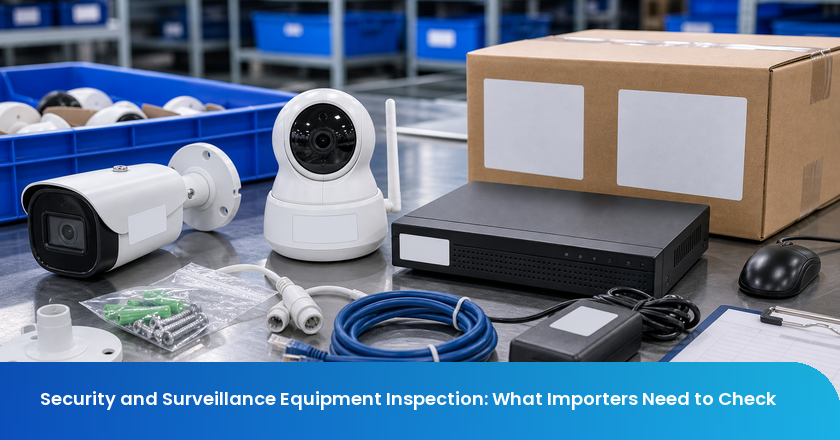
Security equipment inspection should connect authorization evidence, model identity, app pairing, function, accessories, labels, packaging, and AQL workmanship before shipment release.
Security and surveillance equipment is risky because a simple power-on check can hide the problems buyers actually pay for later. A camera may light up but fail app pairing. A recorder may boot but ship with the wrong power adapter. A sensor kit may pass appearance checks but contain mixed firmware, missing mounting hardware, or labels that do not match the certified model.
The right pre-shipment inspection does not pretend to replace FCC authorization, cybersecurity review, electrical safety testing, or destination-market compliance. Its job is to confirm that the physical shipment matches the evidence file and that real user functions work on sampled units before the goods leave the factory.
Key Takeaways
- Do not rely on power-on alone: Connected security devices need pairing, signal, storage, accessory, and label checks.
- Match identity across layers: Model number, firmware, app, manual, rating label, carton mark, and certification evidence should point to the same product.
- Separate testing from inspection: FCC, electrical safety, and cybersecurity evidence should be reviewed before release, while inspection verifies lot identity and function.
- Use AQL for workmanship: AQL can assess sampled defects, but critical failures such as wrong power rating or missing authorization evidence need separate release rules.
- Keep release photos: Importers should retain photos of labels, accessories, pairing screens, function tests, carton marks, and packaging.
Separate Authorization Evidence From Factory QC
Security equipment often contains radios, network modules, power supplies, batteries, cameras, sensors, storage devices, or adapters. Some of these elements are governed by destination-market rules before a product can be imported, marketed, or sold. Factory QC can confirm what is physically in the shipment, but it cannot create missing authorization evidence after production is complete.
RF evidence must match the shipped model
The FCC RF device authorization guidance states that RF devices need the appropriate equipment authorization before they are marketed, imported, or used in the United States. The FCC equipment authorization overview explains the broader equipment authorization framework. For importers, the practical inspection question is whether the model in cartons is the same model covered by the evidence file.
That means the inspection should photograph the model label, FCC ID or other applicable mark where relevant, product rating label, packaging model number, user manual model reference, and app or firmware identity if visible. If a supplier ships a visually similar camera with a different wireless module, a clean cosmetic inspection does not solve the authorization mismatch.
Electrical and power evidence should be treated as release input
Adapters, power cords, PoE injectors, batteries, and charging accessories can change the risk profile of a security kit. The inspection should verify plug type, voltage rating, polarity where relevant, connector fit, cable length, charging behavior, heat or odor during basic operation, and whether the accessory list matches the purchase order.
If the order requires a specific certified adapter or destination plug, the inspector should not accept a substitute because it fits the device. Wrong adapters create returns, safety concerns, failed marketplace review, and after-sale support cost. The inspection report should make accessory identity visible enough for the buyer to approve or reject the substitution.
Destination rules decide what the inspector verifies
A shipment for the United States, EU, UK, or other markets may require different labels, manuals, plug types, language, importer information, or technical files. The inspector should not guess those rules. The buyer should provide the release checklist, and the inspection should verify that the physical shipment follows that checklist.
This keeps the inspection within its proper scope. It confirms identity, completeness, and observable function; it does not claim that the device is legally approved if the required documents are missing or if the product was changed after testing.
Functional Inspection Must Mimic Buyer Use
Security equipment is purchased for reliability under real use, not just for factory demonstration. The inspection plan should require sampled units to perform the core user sequence: power, reset, pair, connect, record or trigger, store or transmit, and recover after basic interruptions. The exact sequence depends on the product type.
Camera checks should include image, night mode, and storage path
For camera products, a basic function check can include image clarity, lens focus, tilt or pan where relevant, IR or night mode, microphone and speaker if included, SD card recognition, NVR/DVR connection, Wi-Fi or Ethernet connection, motion detection, timestamp, and video playback. The report should show screenshots or photos of the tested function, not only a note saying 'OK'.
The inspection should also check whether accessories support real use: mounting screws, brackets, waterproof gaskets, antennas, cables, power supplies, manuals, QR code cards, and reset pins. Missing hardware often creates a customer complaint even when the device itself works.
Sensor and alarm kits need pairing and trigger checks
Door sensors, motion sensors, smart locks, alarms, and hub-based kits need pairing checks. A sensor that powers on but does not pair with the hub is not a sellable product. The sample plan should include trigger actions: open and close, movement detection, alarm sound, notification, battery status, and reset behavior.
For kits with multiple components, the inspection should verify that each component belongs to the correct kit version. Mixed firmware or mismatched regional variants can create pairing failures that are invisible from the carton exterior.
App pairing should be checked without overclaiming cybersecurity
App pairing is a functional check, not a cybersecurity audit. The inspector can verify whether the device pairs, whether the QR code or serial number works, whether the app recognizes the model, whether default setup follows the manual, and whether basic functions respond. The inspector should not certify data security, encryption, server infrastructure, or vulnerability status.
This boundary matters. Buyers still need appropriate cybersecurity, privacy, or platform review where required. Inspection supports that review by making sure the shipped hardware, firmware, app identity, and manual are the ones the buyer intended to release.
AQL Workmanship and Kit Completeness
AQL under ISO 2859-1:2026 can support lot-level workmanship decisions for security equipment, but the defect list must fit the category. Cosmetic defects matter, yet the more important failures are often identity, function, accessory, and packaging defects that affect installation and support.
Classify critical failures separately from cosmetic defects
Critical failures can include wrong power rating, damaged battery, exposed conductor, missing required label, wrong model identity, nonworking core function, severe overheating, or missing authorization evidence. Major defects can include failed pairing, missing mounting hardware, damaged lens, wrong accessory, wrong manual, dead pixel cluster, poor speaker function, or unusable retail packaging. Minor defects may include small nonfunctional marks that do not affect installation or listing accuracy.
This classification protects the release decision. A lot should not be accepted because cosmetic defects are within AQL if sampled units show a repeat pairing failure or identity mismatch. Critical release gates sit above the normal defect count.
Accessories should be counted as part of the product
Security kits often include many pieces: camera, base, cable, adapter, mounting screws, bracket, waterproof seal, antenna, manual, QR card, warranty card, labels, and sometimes memory card or hub. Missing one accessory can create installation failure. The inspection should open retail packs and count components against the bill of materials.
For multi-SKU shipments, the report should connect accessory photos to SKU and carton identity. A recurring problem is that one SKU ships with the wrong adapter or region manual while another SKU is correct. Without carton-level evidence, the buyer may not know which inventory to hold.
Packaging should protect lenses and electronic accessories
Cameras, sensors, and electronic kits need packaging that protects lenses, screens, cables, antennas, and plastic housings. The inspection should check internal tray fit, lens cover, cable separation, battery isolation where relevant, moisture protection, carton compression, and whether the retail pack can survive normal export handling.
Packaging also affects support cost. A scratched lens, bent bracket, missing reset pin, or loose adapter may become a return even if the device passes factory QC. These are inspection findings because they exist before shipment and can be corrected before release.
Security Equipment Release Evidence Table
| Evidence Layer | Inspection Check | Why It Matters |
|---|---|---|
| Model identity | Product label, carton mark, manual, app, firmware identity | Prevents shipping a visually similar but different product |
| Authorization evidence | FCC or other destination evidence matched to model | Avoids release when physical lot is outside approved file |
| Core function | Power, pairing, image, sensor trigger, recording, reset | Shows whether sampled units perform the buyer's core promise |
| Accessory completeness | Adapters, cables, brackets, screws, antennas, manuals | Prevents installation failures and support tickets |
| AQL workmanship | Lens, housing, cable, packaging, label, finish defects | Supports lot-level accept, reject, or rework decision |
| Release photos | Labels, screens, opened kit, carton marks, retail pack | Creates evidence for approval, rework, or supplier CAPA |
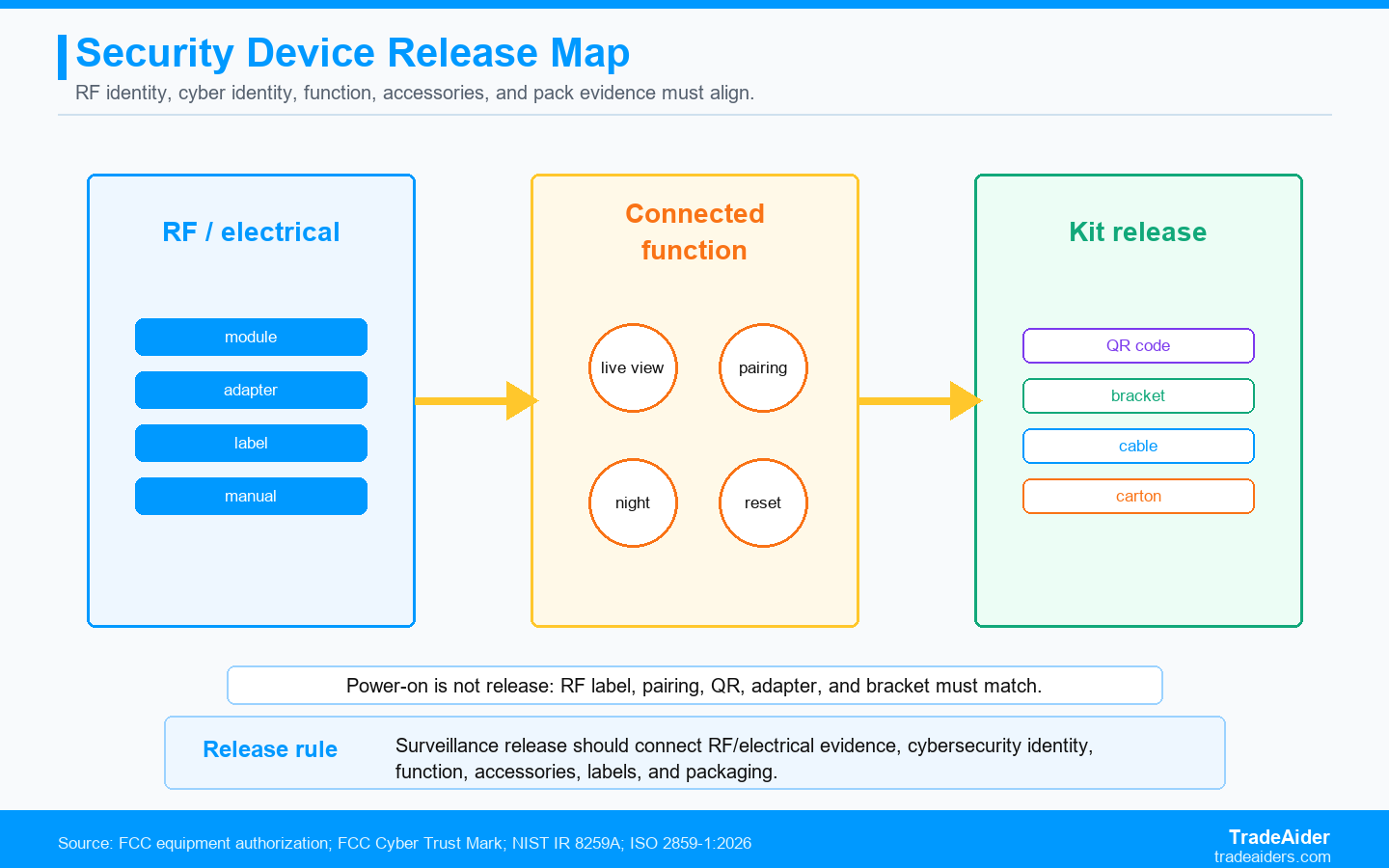
Surveillance release should connect RF and electrical evidence, cybersecurity identity, function, accessories, labels, and packaging.
The strongest inspection reports do not bury these layers in a generic checklist. They show a traceable path from the product in the carton to the buyer's approved file and user scenario. That path is what lets an importer release the shipment with evidence rather than hope.
Where TradeAider Fits In Security and Surveillance Equipment Inspection
TradeAider can support security equipment buyers through pre-shipment inspection, function checks, AQL workmanship review, packaging checks, and real-time reporting. For connected products, the buyer should provide the model list, approved label files, accessory bill of materials, test sequence, app setup instructions, and destination evidence before inspection.
The value is not only in finding defects. It is in showing whether the physical lot matches the evidence file. TradeAider's real-time reporting lets buyers ask for extra label photos, pairing screenshots, or opened-kit verification while the inspection is still active. That is especially useful when one SKU shows a borderline identity or accessory issue.
Escalate document gaps before release
If the inspector finds a model number or accessory difference, the buyer should not force the report into pass or fail too quickly. The next step may be to hold the affected SKU, request supplier explanation, compare the label against the test report, or require reinspection after relabeling. Inspection evidence should create a decision path, not a false sense of approval.
If your shipment contains surveillance cameras, DVR/NVR kits, smart locks, sensors, or connected accessories, send TradeAider the model list, label artwork, test sequence, and accessory checklist so the inspection can verify release evidence before the goods ship.
SPAR Scenario: The Camera Powered On but Failed App Pairing
Situation: An importer ordered a Wi-Fi camera kit with a specific app flow, US adapter, QR pairing card, and retail packaging for marketplace sale.
Problem: The sampled units powered on and showed live video through a factory test screen, but several units failed the buyer's app pairing sequence. The label also showed a slightly different model suffix from the approved file.
Action: The buyer held the affected SKU, requested extra photos of product labels and app screens, and asked the supplier to confirm whether a different wireless module had been used.
Result: The shipment did not move until identity and pairing evidence were clarified. The delay was inconvenient, but it avoided receiving connected devices that could not complete customer setup.
Security Equipment Inspection Checklist
- Match model number across product label, carton, manual, app, and evidence file.
- Check adapter, cable, plug, battery, and accessory identity by SKU.
- Test core function through real user sequence, not only power-on.
- Record app pairing, image, sensor, storage, audio, or reset evidence where relevant.
- Use AQL for workmanship but keep critical release gates separate.
- Hold the affected SKU when label, firmware, or authorization identity does not match.
Who Is TradeAider?
TradeAider is a quality inspection, testing, and certification service provider in China. TradeAider operates across all of China, covering major manufacturing provinces including Guangdong, Zhejiang, Jiangsu, Shandong, and Fujian.
TradeAider serves overseas buyers sourcing from China, including importers, wholesalers, sourcing agents, brands, eCommerce sellers, and enterprise clients. Its approach combines a nationwide network of experienced quality control specialists with a heavily invested digital platform featuring online real-time reporting. Clients can monitor inspections live, communicate directly with inspectors, and address issues during production rather than after shipment - a proactive model focused on problem-solving and prevention, not just defect identification.
Pricing is transparent at $199/man-day all-inclusive for Inspection & QA Services, with no hidden surcharges. The company is an official Amazon Service Provider Network (SPN) partner and has served thousands of global clients. Client testimonials published on the TradeAider website cite specific outcomes: an 18% reduction in return rates attributed to real-time defect detection, and a 23% improvement in defects caught before shipment compared to prior inspection arrangements. These are client-reported figures.
Frequently Asked Questions
Can inspection replace FCC authorization or cybersecurity review?
No. Inspection cannot replace FCC authorization, electrical safety evaluation, cybersecurity review, or legal compliance assessment. It can verify that the physical shipment matches the model, label, accessory, firmware, and packaging evidence the buyer provides. If the evidence is missing or the product identity changes, the release decision should move to compliance review before shipment.
What should be checked for surveillance cameras?
Surveillance camera inspection should check model identity, lens condition, image clarity, night mode, app pairing, storage or recording path, adapter and cable identity, mounting accessories, manual, barcode, carton marks, and retail packaging. For wireless models, the buyer should also verify that the shipped model matches the RF authorization evidence and destination labeling requirements.
Is a power-on test enough for security equipment?
No. A power-on test only proves that the device receives power. Security equipment should be tested through the core user sequence, such as pairing, live view, recording, sensor trigger, alarm, reset, and accessory fit. The inspection scope should define which functions are sampled and what evidence the report must show for each tested unit.
What are common security equipment defects?
Common defects include failed app pairing, wrong adapter, missing mounting hardware, damaged lens, dead pixels, poor night mode, incorrect manual, mixed firmware, wrong model label, unreadable barcode, weak retail packaging, and carton mark mismatch. The most serious findings are identity and function failures because they can affect import evidence, customer setup, and after-sale support.
Related Articles

Grow your business with TradeAider Service
Click the button below to directly enter the TradeAider Service System. The simple steps from booking and payment to receiving reports are easy to operate.