- About Us

- Our Services
- Your Industry
- Resources
- News & Blog

For importers new to quality control, the AQL (Acceptable Quality Limit) system can seem intimidating with its tables, code letters, and statistical terminology. Yet mastering AQL calculation is essential for effective product inspection—it determines how many units to inspect, what defect levels are acceptable, and ultimately whether your shipment passes or fails quality verification. This beginner-friendly guide demystifies the AQL calculator, walking you through each step of sample size determination and acceptance limit calculation. Whether you're preparing for your first pre-shipment inspection or looking to better understand the inspection reports you receive, this guide provides the practical knowledge you need to make informed quality control decisions.
Key Takeaways
- AQL calculator fundamentals — Understanding what an AQL calculator does and why it matters for quality inspection
- Step-by-step calculation process — How to determine sample size, inspection level, and acceptance numbers
- Inspection level selection — Choosing between general and special inspection levels for your situation
- Practical examples — Real-world scenarios demonstrating AQL calculator usage
What is an AQL Calculator?
An AQL calculator is a tool that helps importers and quality professionals determine the appropriate sample size and acceptance criteria for product inspections based on the ISO 2859-1 standard. Rather than manually searching through complex statistical tables, an AQL calculator automates the process—simply enter your lot size and inspection parameters, and the calculator outputs the number of units to inspect and the maximum acceptable defects for each defect category.
The AQL system operates on a fundamental principle: you don't need to inspect every unit in a shipment to determine whether the overall quality is acceptable. By inspecting a statistically determined sample and applying acceptance criteria, you can make reliable decisions about batch quality without the time and cost of 100% inspection. The AQL calculator makes this statistical approach accessible to anyone, regardless of their background in quality statistics.
Why Use an AQL Calculator?
The traditional method of determining sample sizes involves manually consulting two interconnected tables—one to find the sample size code letter based on lot size and inspection level, and another to determine the actual sample size and acceptance numbers based on that code letter and your chosen AQL values. This process is time-consuming and prone to errors, particularly for those unfamiliar with the table structure and notation conventions.
An AQL calculator eliminates these challenges by performing both table lookups instantly and presenting results in an easy-to-understand format. For regular importers managing multiple inspections, the time savings are substantial. More importantly, calculators reduce the risk of calculation errors that could lead to incorrect acceptance decisions—either rejecting good shipments or, worse, accepting shipments with excessive defects. Try our AQL calculator to experience how this tool simplifies quality control planning.
How AQL Calculators Work: The Three Inputs
AQL calculators require three essential inputs to generate sampling plans. Understanding these inputs is crucial for obtaining meaningful results and applying them correctly to your quality inspection process.
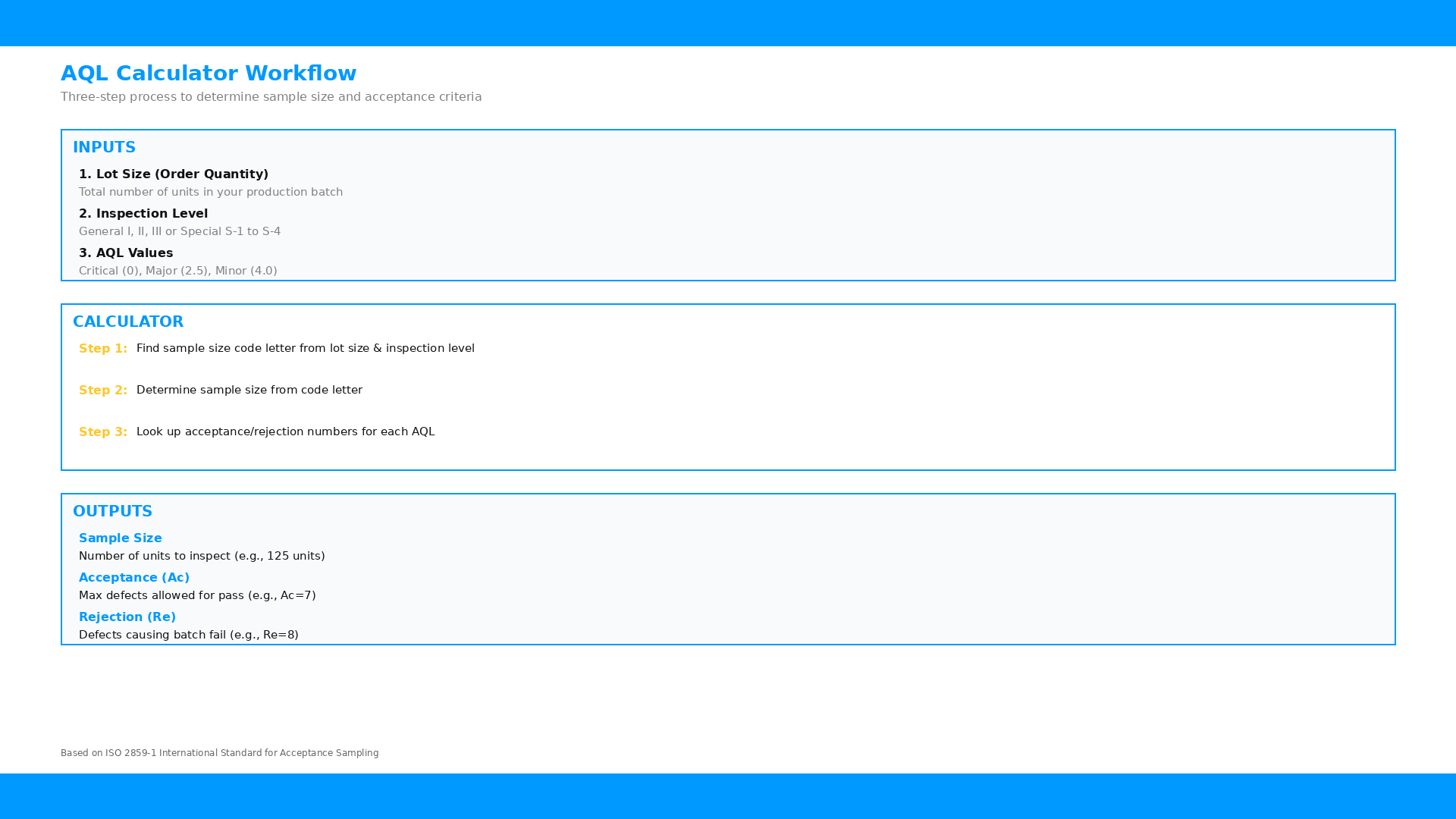
Figure 1: AQL calculator workflow showing inputs, calculation process, and outputs
Input 1: Lot Size (Order Quantity)
The lot size is the total number of units in your production batch that will be subject to quality inspection. This is typically your complete order quantity for pre-shipment inspection, or the quantity of units available for inspection if production is still in progress. The lot size directly influences sample size through the AQL table structure—larger lots require larger sample sizes to maintain statistical validity, but the ratio of sample size to lot size actually decreases as lot size increases.
Accurate lot size determination is important for correct sample size calculation. For pre-shipment inspection, the lot size should represent 100% of the production quantity when inspection is scheduled. If production is partially complete, some inspection protocols allow inspection of available quantities with the understanding that results apply only to inspected portions. Work with your inspection provider to determine the appropriate lot size for your specific situation.
Input 2: Inspection Level
The inspection level determines the sampling intensity relative to lot size. ISO 2859-1 defines three general inspection levels (I, II, III) and four special inspection levels (S-1 through S-4). The choice of inspection level affects both sample size and the discriminating power of the inspection—higher levels use larger samples and provide greater ability to distinguish between acceptable and unacceptable lots.
| Level | Sample Size | When to Use |
|---|---|---|
| General I | Smallest | Low-risk products, proven suppliers, cost-sensitive situations |
| General II | Standard | Default choice for most inspections, balanced approach |
| General III | Largest | Critical products, new suppliers, high-risk situations |
| Special S-1 to S-4 | Very small | Destructive testing, expensive products, limited inspection time |
General Inspection Level II is the default choice for most product inspections because it provides a balanced approach between statistical reliability and inspection cost. According to quality control experts, Level II is appropriate for routine inspections where normal quality assurance is required. Use Level I when you have confidence in supplier quality or need to minimize inspection costs, and Level III when quality risk is elevated or the consequences of accepting defective products are severe.
Input 3: AQL Values for Each Defect Type
AQL values represent the maximum acceptable percentage of defective items for each defect category. Most inspections use three AQL values corresponding to three defect types: critical defects (AQL 0 or very low), major defects (typically AQL 2.5), and minor defects (typically AQL 4.0). The AQL values you choose depend on your product type, market requirements, and quality standards.
Critical defects warrant special consideration. An AQL of 0 means zero tolerance—any critical defect found results in batch rejection. This strict standard applies to safety hazards, regulatory non-compliance, and other defects that could cause harm or legal issues. Major defects affect product functionality or significantly impact customer satisfaction, while minor defects are cosmetic issues that don't affect product use. Setting appropriate AQL values for your products ensures inspection results align with your quality requirements.
AQL Calculator Outputs Explained
Once you input lot size, inspection level, and AQL values, the calculator generates several essential outputs that guide your inspection process. Understanding these outputs ensures you can apply the results correctly to your quality control activities.
Sample Size
The sample size is the number of units that must be inspected to achieve statistically valid results. This is the primary output from the first AQL table lookup—the calculator determines the sample size code letter based on lot size and inspection level, then translates that code into an actual sample size number. For example, a lot of 1,000 units inspected at General Level II requires a sample size of 80 units.
The sample size is fixed regardless of how many defect categories you're evaluating. If you're checking for critical, major, and minor defects, you inspect the same 80 units for all three defect types—you don't need separate samples for each category. This efficiency makes AQL sampling practical for multi-criteria inspections while maintaining statistical validity across all quality parameters.
Acceptance and Rejection Numbers
For each AQL value, the calculator outputs two numbers: the acceptance number (Ac) and rejection number (Re). The acceptance number represents the maximum number of defects allowed for the batch to pass inspection. If the actual defect count is equal to or less than the acceptance number, the batch is accepted. The rejection number is typically one more than the acceptance number—if defects reach or exceed this threshold, the batch fails inspection.
For single sampling plans (the most common type), the acceptance and rejection numbers work simply: count the defects found during inspection and compare to the acceptance number. For example, if your acceptance number for major defects is 5 and you find 5 or fewer major defects in the sample, the batch passes for major defects. If you find 6 or more, it fails. The calculator presents these thresholds clearly so you know exactly what results constitute pass or fail.
Step-by-Step: Using an AQL Calculator
Let's walk through a practical example of using an AQL calculator for a typical inspection scenario. This example demonstrates the complete process from input to interpretation.
Example Scenario
You're a kitchenware importer with a pre-shipment inspection scheduled for an order of 2,500 stainless steel utensils from a Chinese supplier. You want to determine the sample size and acceptance criteria for this inspection. Let's use the standard inspection parameters: General Inspection Level II, with AQL 0 for critical defects, AQL 2.5 for major defects, and AQL 4.0 for minor defects.
Step 1: Enter Lot Size
Enter 2,500 as the lot size. This represents your complete order quantity for the pre-shipment inspection. The calculator will use this to find the appropriate sample size code letter from the first AQL table.
Step 2: Select Inspection Level
Select General Level II from the inspection level options. This is the standard level for routine inspections and provides a balanced approach between statistical confidence and inspection efficiency. For this supplier, whose quality history you're still establishing, Level II is appropriate.
Step 3: Specify AQL Values
Enter your AQL values: 0 for critical defects, 2.5 for major defects, and 4.0 for minor defects. These values represent industry-standard settings that balance quality assurance with practical inspection economics. For food-contact kitchenware, you might want to verify that these levels meet your target market requirements.
Step 4: Review Calculator Outputs
The calculator returns the following results:
| Parameter | Value | Meaning |
|---|---|---|
| Sample Size | 125 units | Inspect 125 randomly selected units from the 2,500-unit lot |
| Critical (AQL 0) | Ac=0, Re=1 | Zero critical defects allowed; any critical defect fails the batch |
| Major (AQL 2.5) | Ac=7, Re=8 | Up to 7 major defects acceptable; 8 or more fails the batch |
| Minor (AQL 4.0) | Ac=10, Re=11 | Up to 10 minor defects acceptable; 11 or more fails the batch |
Step 5: Apply Results to Inspection
Share these parameters with your inspection provider. During inspection, the inspector will randomly select 125 units from throughout the lot—ensuring the sample is representative of the entire production. Each sampled unit is evaluated against the inspection checklist, with defects categorized as critical, major, or minor. The final defect counts are compared to the acceptance numbers to determine batch disposition.
If inspection results show 0 critical defects, 5 major defects, and 8 minor defects, the batch passes all criteria. However, if results show 1 critical defect, the entire batch fails regardless of major and minor defect counts. This strict standard for critical defects reflects the serious nature of safety-related and compliance issues.
Common AQL Calculator Mistakes to Avoid
While AQL calculators simplify the sampling process, several common mistakes can lead to incorrect results or misapplication of inspection criteria.
Mistake 1: Using the Wrong Lot Size
Some importers enter only the quantity available for inspection rather than the total order quantity, particularly when production isn't complete at inspection time. This underestimates the lot size and may result in an undersized sample. For pre-shipment inspection, the lot size should reflect the complete order quantity. If production is incomplete, clarify with your inspection provider whether the partial inspection will apply only to available quantities or whether a follow-up inspection is needed.
Mistake 2: Selecting Inappropriate Inspection Levels
Choosing inspection levels based on cost rather than risk assessment leads to inadequate quality assurance. While Level I requires fewer samples and costs less, it provides less statistical confidence and may fail to detect quality issues that Level II or III would catch. Reserve Level I for situations where supplier quality history is excellent or where defect consequences are minor. For most importers, Level II provides the right balance and should be the default choice.
Mistake 3: Misunderstanding Critical Defect AQL
Setting AQL 0 for critical defects means zero tolerance, but some importers misunderstand this to mean "zero defects found" rather than "zero defects allowed." The distinction matters—if a critical defect is found, the batch fails immediately, but the inspection continues to complete the sample evaluation for major and minor defects. This complete documentation supports follow-up actions and root cause analysis with the supplier.
Advanced AQL Calculator Features
Modern AQL calculators offer features beyond basic sample size calculation that enhance inspection planning and documentation.
Multiple Sampling Plans
Some calculators support double and multiple sampling plans, which allow for sequential sampling decisions. In a double sampling plan, if the first sample results fall in a gray zone between acceptance and rejection, a second sample is taken before making a final decision. While more complex, these plans can reduce average inspection costs while maintaining statistical validity. Consult with your inspection standard documentation to determine whether multiple sampling is appropriate for your situation.
Reduced and Tightened Inspection
ISO 2859-1 includes provisions for switching between normal, reduced, and tightened inspection based on supplier quality history. After consistent quality performance, you may qualify for reduced inspection with smaller samples. Conversely, poor quality history triggers tightened inspection with more stringent acceptance criteria. Advanced calculators can track this history and recommend appropriate inspection stringency.
Integrating AQL Calculations with Inspection Services
AQL calculator results provide the framework for your inspection, but effective quality control requires proper integration with professional inspection services. The calculator tells you how many units to inspect and what defect levels are acceptable, but trained inspectors must perform the actual product evaluation against your quality criteria.
When scheduling a pre-shipment inspection, provide your inspection provider with the calculated sample size and acceptance criteria, along with your detailed inspection checklist specifying what constitutes each defect type for your products. This combination of statistical framework and product-specific criteria ensures inspections are both statistically valid and relevant to your quality requirements.
For importers seeking comprehensive quality assurance without managing these technical details, TradeAider's WeGuarantee Total Quality Control service handles all aspects of quality planning and inspection, from AQL determination through inspection execution and follow-up. This full-service approach is particularly valuable for importers without in-house quality expertise or those managing complex product portfolios.
Common Questions About AQL Calculators
How accurate are AQL calculators?
AQL calculators are highly accurate when provided with correct inputs. They implement the exact formulas and table lookups defined in ISO 2859-1, the international standard for acceptance sampling. Calculator accuracy depends entirely on the user entering the correct lot size, selecting the appropriate inspection level, and choosing AQL values that match their quality requirements. The calculator is a tool that automates table lookup—the statistical validity of results depends on the appropriateness of your input parameters.
Can I use different AQL values for different products?
Yes, different products may warrant different AQL values based on risk profile, market requirements, and quality positioning. Premium products or those with safety implications typically use stricter AQL values, while commodity products might accept higher defect tolerance. Document your AQL standards by product category and communicate these to your inspection provider to ensure consistent application across all inspections.
What happens if my sample size exceeds my lot size?
If the calculated sample size equals or exceeds your lot size, the standard requires 100% inspection rather than sampling. This situation typically occurs with small orders where sampling wouldn't provide meaningful statistical results. In such cases, every unit in the lot is inspected, and defect counts are compared directly to acceptance criteria without sampling adjustment.
Should I use an AQL calculator for every inspection?
For routine inspections of similar products with consistent lot sizes, you may not need to recalculate for each inspection once you've established your standard parameters. However, you should verify calculations when lot sizes change significantly, when switching inspection levels, or when quality requirements change. Many importers maintain a reference table of calculated sample sizes for their common order quantities and inspection levels.
Conclusion
The AQL calculator is an essential tool for importers conducting quality inspections in China. By understanding the three key inputs—lot size, inspection level, and AQL values—and properly interpreting the outputs, you can establish inspection protocols that provide statistically valid quality assurance without the complexity of manual table lookups. Whether you use our AQL calculator directly or work with inspection professionals who handle these calculations for you, this knowledge helps you make informed decisions about quality control and ensures your inspection results align with your quality requirements.
Ready to implement AQL-based quality inspection for your China sourcing? Contact our team to discuss your specific requirements and receive guidance on appropriate inspection parameters for your products and quality standards.
Related Articles

Grow your business with TradeAider Service
Click the button below to directly enter the TradeAider Service System. The simple steps from booking and payment to receiving reports are easy to operate.