- Acerca de Nosotros

- Nuestros Servicios
- Su Industria
- Recursos
- Noticias y Blog
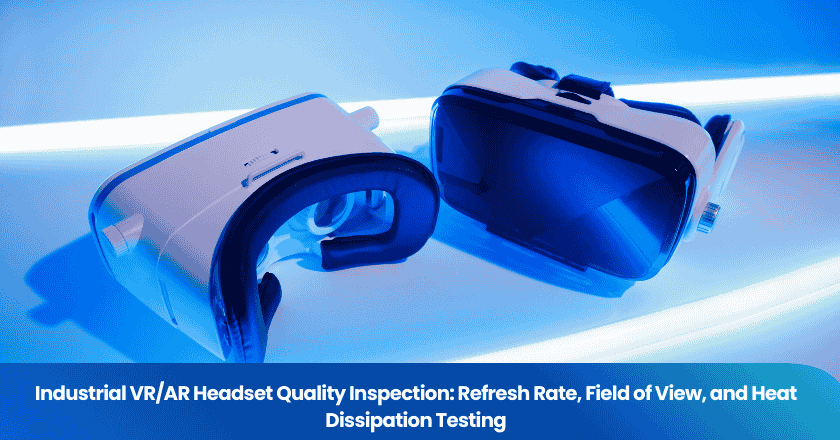
An industrial VR headset that reports 90 Hz but actually delivers 72 Hz will induce motion sickness in operators using it for training simulations. A headset claiming 110° horizontal field of view that genuinely provides 85° creates dangerous peripheral blind spots in maintenance and surgical training scenarios. A unit that overheats after 40 minutes of use shuts down a training session mid-procedure or, worse, causes thermal discomfort that exposes workers to occupational health risks. These are not edge cases — they are among the most common performance shortfalls found in industrial VR and AR headsets sourced from Chinese manufacturers without structured pre-shipment verification.
This guide details what a quality inspection for industrial VR/AR headsets must cover across three critical performance dimensions: refresh rate accuracy, field of view verification, and thermal performance under extended operational load. Whether you are procuring training headsets for a manufacturing facility, warehouse, or healthcare environment, these are the tests that determine whether your equipment delivers on its specification or quietly underperforms from day one.
Key Takeaways
- Industrial VR/AR headset refresh rate must be verified instrumentally — factory-stated values frequently differ from actual output, and the gap directly causes user motion sickness and reduced training effectiveness.
- Manufacturers' FOV claims are routinely inconsistent with measured values; verified FOV testing using imaging colorimetry systems is required for accurate specification compliance.
- Published research recommends headset microclimate temperature be kept below 36°C during extended use; thermal testing under representative duty cycles should be a mandatory inspection step before accepting any industrial deployment.
Why Industrial VR/AR Headsets Require Specialist Inspection Protocols
Consumer VR headsets are evaluated primarily on immersiveness and entertainment value. If a consumer headset delivers slightly lower refresh rates or a marginally narrower FOV than advertised, the user experience is reduced but no workplace consequence follows. Industrial deployments operate under different stakes. A technician using an AR overlay to guide maintenance on high-voltage equipment needs accurate spatial alignment — a FOV shortfall that mis-positions digital overlays relative to physical components creates safety exposure. A surgeon in a VR surgical training simulation experiencing nausea from refresh rate instability cannot complete their training objective. An operator wearing a headset in a hot industrial environment needs thermal management that prevents the microclimate temperature — the air between device and face — from exceeding the physiological comfort threshold during a full work shift.
Chinese manufacturing of VR/AR hardware has scaled rapidly, and the range of quality is wide. Tier-1 suppliers producing OEM hardware for global brands invest in display calibration and thermal management engineering. Tier-2 and Tier-3 suppliers producing for the industrial procurement market — often white-labeling hardware — may cut corners on display controller calibration, lens quality, and thermal interface materials. Without instrument-based pre-shipment testing, the buyer cannot distinguish between them from the specification sheet alone.
TradeAider's pre-shipment inspection service supports customized technical checklists for complex electronic products, with real-time reporting during inspection so your technical team can review results as they are generated and intervene immediately if critical parameters fall outside specification.
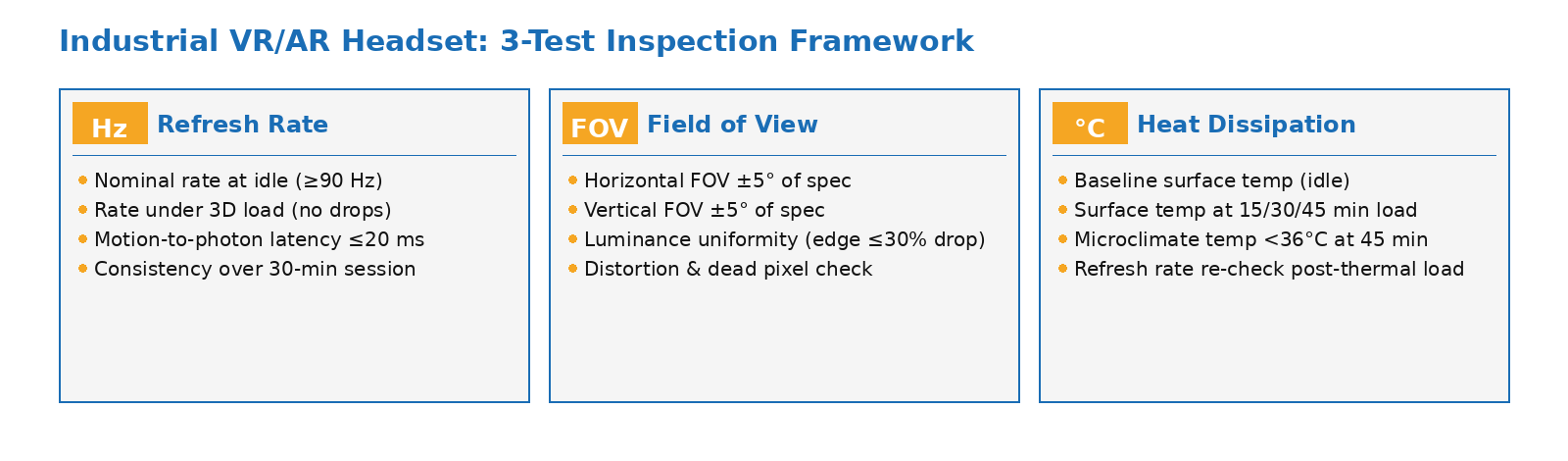
The three mandatory test pillars for industrial VR/AR headset pre-shipment inspection: refresh rate stability, field of view accuracy, and sustained thermal performance.
Test 1: Refresh Rate Verification
Why Refresh Rate Accuracy Matters for Industrial Use
Refresh rate — measured in Hz — describes how many times per second the headset's display redraws the image. For industrial VR applications, the minimum acceptable refresh rate is generally 90 Hz; below this threshold, the mismatch between visual motion and vestibular system feedback increases the likelihood of motion-to-photon latency effects, commonly experienced as nausea, disorientation, and eye strain. Most enterprise VR platforms target 90–120 Hz for training applications, with some high-performance platforms operating at 144 Hz.
The critical inspection issue is that display controllers in lower-cost headsets are often set to output at a stated rate but may drop frames under processing load, effectively delivering an inconsistent refresh cadence that is perceptually worse than a stable lower rate. A headset that claims 90 Hz but actually delivers 90 Hz with frame drops to 72 Hz under computational load creates intermittent motion sickness that is more disruptive than a stable 72 Hz headset would be. Frame drop behavior only becomes apparent under load — it cannot be detected by checking specifications or performing static tests.
How Refresh Rate Is Measured and What to Look For
Instrumental refresh rate verification uses a high-speed photodiode or an imaging photometer capturing the display at a frame rate significantly above the claimed output rate. The measurement system detects the luminance transitions between frames and calculates the actual delivered frame period. This produces a frame time histogram that reveals both the nominal rate and any irregularity in frame delivery. Inspectors should verify:
| Parameter | Test Condition | Industrial Minimum Requirement |
|---|---|---|
| Nominal refresh rate | Idle / home screen | Matches stated specification (±2 Hz) |
| Refresh rate under load | Active rendering of representative 3D content | No sustained frame drops; <2% frames outside ±5 Hz of nominal |
| Motion-to-photon latency | Head movement triggered display change | ≤ 20 ms for training applications |
| Refresh rate consistency | 30-minute continuous operation | No degradation vs. cold-start measurement |
Motion-to-photon (M2P) latency — the delay between a physical head movement and the corresponding image update — is closely related to refresh rate but distinct from it. Industrial testing specialist OptoFidelity describes M2P as one of the most demanding measurements to perform correctly, requiring precise synchronization of motion and photon detection systems. For a buyer sourcing industrial headsets, requesting the manufacturer's M2P latency test records and verifying them against the stated specification during pre-shipment inspection is a meaningful quality gate for applications where user comfort is operationally critical.
Test 2: Field of View Verification
The Gap Between Claimed and Measured FOV
Field of view in VR/AR headsets is reported as the angular range visible through the lens system — typically expressed as horizontal × vertical degrees, or as a single diagonal figure. For professional applications, horizontal FOV below 90° causes tunnel vision effects that reduce spatial awareness and increase cognitive load; enterprise deployments generally require 100° or more for industrial training, with medical simulation applications often specifying 120°+.
The inspection problem is well documented: independent research has consistently found that manufacturers' stated FOV values do not match measured values. A peer-reviewed study published in Virtual Reality found that manufacturers' FOV claims were "mostly unrealistic" when verified against instrumental measurements, with discrepancies arising from interpupillary distance variation and eye relief — the distance between the lens and the user's eye. A headset stating 110° horizontal FOV may deliver 88–95° for users outside a narrow central IPD range.
For industrial procurement — where headsets will be used across a workforce with varying facial geometries — the effective FOV at a representative range of eye relief values is more operationally relevant than a single peak specification.
FOV Measurement Methods for Pre-Shipment Inspection
Accurate FOV measurement for near-eye displays requires a specialized optical setup. Standard camera lenses cannot replicate the human eye's position within a headset — the lens aperture position and housing dimensions prevent them from reaching the eye position and capturing the full display angular range. Instruments designed for this purpose, such as the imaging colorimeter systems described by Radiant Vision Systems and Gamma Scientific, use custom optical elements with the aperture at the front of the lens to simulate the human pupil position, enabling measurement of the full displayed FOV up to 120° horizontal by 80° vertical in a single capture.
For a pre-shipment inspection, FOV verification should cover:
| Measurement | Method | Acceptable Outcome |
|---|---|---|
| Horizontal FOV (binocular) | Imaging colorimeter with NED lens at nominal IPD | Within ±5° of stated specification |
| Vertical FOV | Same instrument, vertical axis measurement | Within ±5° of stated specification |
| Display luminance uniformity | Full FOV luminance map — imaging colorimeter | No edge luminance drop >30% vs. center |
| Display distortion (barrel/pincushion) | Grid test pattern viewed through lens | Distortion within correction range of headset software |
| Dead pixel / display defect screen | Full white, black, red, green, blue test screens | Zero dead pixels or cluster defects in central 60% of FOV |
Buyers should request the manufacturer's display test data for each production lot, specifying that FOV and luminance measurements must be taken at the eye relief distance specified in the product datasheet — not at an extended distance that artificially inflates the reported angular range.
Test 3: Heat Dissipation Verification
Why Heat is an Industrial Safety and Performance Issue
Industrial VR and AR headsets are worn for longer sessions than consumer entertainment headsets — training sequences, remote expert guidance sessions, and maintenance procedure overlays can require 45 to 90 minutes of continuous wear. During this period, the headset functions as an insulating layer between the display's heat output and the user's face. Research published in the journal Applied Ergonomics found that headset microclimate temperature — the air trapped between the device and the user's face — should be kept below 36°C to prevent thermal discomfort that degrades concentration and performance. A separate peer-reviewed study found that microclimate temperature increases by an average of 7.8°C after 45 minutes of continuous use across a sample of commercial headsets.
Beyond user comfort, excessive heat has direct consequences for device performance. Thermal throttling — where the processor automatically reduces clock speed to prevent damage from overheating — directly reduces rendering performance and can drop the effective refresh rate below acceptable thresholds. In headsets sourced from suppliers who use inadequate thermal interface materials (TIMs) between the processor and heat spreader, throttling can begin within 20–30 minutes of active use under industrial processing loads.
Thermal Testing Protocol for Industrial Headset Inspection
Thermal testing requires sustained operation under representative load — a quick power-on check will not reveal throttling or microclimate heat buildup. The inspection protocol should include:
Step 1 — Baseline measurement: With the headset powered on and in idle state, measure surface temperature at the processor zone (typically the top front of the device) and at the facial interface padding using an IR thermometer or non-contact probe.
Step 2 — Load test (45 minutes minimum): Run the headset under a graphics-intensive scene representative of its intended application. At 15-minute intervals, record surface temperature at the processor zone and the facial contact point. The inspector should also record whether any thermal throttling indicators appear in the system diagnostics.
Step 3 — Microclimate temperature check: At the 30- and 45-minute marks, use a thermocouple or datalogger placed at the facial seal to record the trapped air temperature. This value should remain below 36°C for standard indoor environments. Values consistently above 38°C indicate insufficient ventilation design or thermal management material shortfalls in the production batch.
Step 4 — Performance consistency check: After the 45-minute thermal load test, re-verify the refresh rate measurement from Test 1. Any drop from the cold-start baseline indicates thermal throttling and constitutes a specification failure under load.
For Chinese-manufactured industrial headsets, the most common source of thermal failure is the use of low-conductivity TIM between the system-on-chip (SoC) and the internal heat spreader. This is a manufacturing substitution that saves pennies per unit but consistently causes field performance issues. IR imaging during the load test will show an isolated hot spot rather than a distributed temperature profile if TIM application is inadequate — a diagnostic signature that justifies rejection of the batch and a corrective action request to the factory.
TradeAider's during production inspection service can be deployed mid-production to verify that the correct TIM specification is being applied before the assembly line completes the full production run — making corrections significantly cheaper than a batch rejection at pre-shipment stage.
Building the Complete Inspection Checklist for Industrial VR/AR Headsets
What a Full Pre-Shipment Inspection Should Cover
Beyond the three technical subsystems above, a complete pre-shipment inspection for industrial VR/AR headsets should also address hardware integrity (lens scratches, display cable seating, IPD adjustment mechanism function), software and firmware version verification (confirming correct firmware is installed and that no unauthorized modifications are present), accessories completeness (charging cables, carry cases, padding sets), and packaging compliance for the destination market.
The TradeAider inspection standard provides the methodological framework for structuring a defect classification system appropriate to technical products — distinguishing critical defects (failures that prevent safe or functional use), major defects (failures that significantly impair intended function), and minor defects (cosmetic or peripheral issues) — and applying the appropriate AQL sampling level to each category.
For high-value industrial headsets where refresh rate and thermal compliance are safety-relevant, buyers should consider specifying 100% functional testing of refresh rate and display quality for the first production batch from a new supplier, transitioning to AQL-based sampling once supplier capability has been demonstrated across multiple consistent runs.
Aligning Inspection Requirements with Your Application
The inspection specification for industrial VR/AR headsets should be calibrated to the actual use case. Warehouse training applications with 20-minute sessions have lower thermal threshold requirements than surgical simulation platforms running 90-minute procedures. Construction AR overlays need rigorous FOV verification because spatial accuracy is safety-critical. Remote maintenance guidance headsets need refresh rate verification under wireless video streaming conditions rather than just local rendering. Sharing the application context with your inspection provider ensures the checklist is built for your actual risk profile — not a generic electronics checklist.
Use the Inspection Charge Calculator to estimate costs for your headset procurement inspection, or contact TradeAider to discuss a custom inspection protocol aligned to your industrial deployment requirements.
Frequently Asked Questions
What refresh rate is the minimum acceptable for industrial VR training applications?
90 Hz is the widely accepted minimum for industrial VR training. Below this rate, the mismatch between head movement and visual update increases the probability of motion sickness symptoms in most users. For applications requiring extended sessions of 45+ minutes, 90 Hz with consistent frame delivery — no drops under processing load — is more important than a peak specification of 120 Hz that degrades under use.
Why do manufacturers' stated FOV values differ from measured values?
Manufacturers typically report the rendered or theoretical FOV of the display and lens system under ideal optical conditions. In practice, the effective perceived FOV varies significantly with the user's interpupillary distance and eye relief — the distance between lens and cornea. Peer-reviewed measurement studies consistently find that claimed FOV figures exceed measured values, particularly for users outside the median IPD range. For industrial procurement involving a diverse workforce, specifying and verifying FOV at a stated eye relief condition is essential.
How do I know if a headset is thermal throttling during inspection?
Thermal throttling can be detected by comparing refresh rate measurements taken at cold start against measurements taken after 30–45 minutes of active load. A drop in measured refresh rate under thermal load indicates throttling. Additionally, many VR/AR operating systems expose thermal state through developer diagnostics — an inspector can review processor thermal zone temperature logs after the load test. IR imaging of the device during operation provides a spatial map of the thermal distribution that reveals hot spots indicative of inadequate TIM application.
Should I require 100% testing or AQL sampling for a first order of industrial VR headsets?
For first orders from a new supplier, 100% functional testing of refresh rate and display quality is advisable, especially if the headsets will be deployed in safety-relevant applications. The additional inspection cost is small relative to the cost of deploying underperforming hardware across an industrial workforce. Once consistent supplier performance is demonstrated across two or three production runs, transitioning to AQL-based sampling for ongoing procurement is a reasonable cost-efficiency measure. TradeAider's e-commerce quality solutions and industrial inspection team can advise on the appropriate sampling plan for your procurement volume and risk tolerance.
Conclusion
Refresh rate, FOV, and heat dissipation are the three performance parameters that determine whether an industrial VR or AR headset does its job in the field — or generates worker complaints, safety concerns, and costly replacements within months of deployment. All three require instrument-based testing under representative conditions; none can be verified by reading the specification sheet. Sourcing these products from Chinese manufacturers without a structured pre-shipment inspection protocol is a procurement risk that the verification cost more than justifies eliminating.
Contact TradeAider to design a pre-shipment inspection plan for your industrial VR/AR headset procurement, with real-time reporting during the inspection and an official report within 24 hours.
Artículos Relacionados

Haga crecer su negocio con el Servicio TradeAider
Haga clic en el botón de abajo para ingresar directamente al Sistema de Servicios TradeAider. Los pasos simples desde la reserva y el pago hasta recibir los informes son fáciles de operar.