
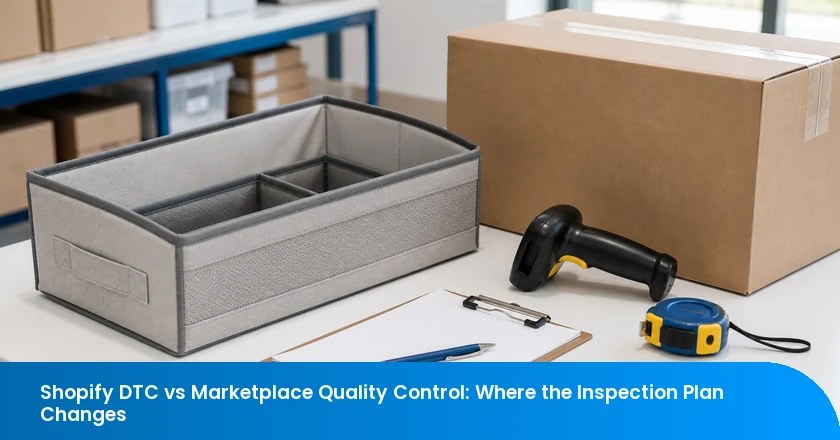
For one factory lot, quality control for a Shopify storefront and a marketplace should begin with the same question: does the named product and its pack match the approved reference? The difference appears after that check. A marketplace route can add a platform listing, document workflow, unit-label reference, or inbound requirement.
Keep the physical quality baseline common, then create a separate current route file for the Shopify allocation and for the marketplace allocation. This avoids both extremes: treating a platform label as proof of product quality, or treating a passed inspection as approval of a live listing.
The Physical Check Is Similar; the Release File Is Not
A Shopify merchant owns the customer-facing store and remains responsible for the product offer, transactions, and applicable compliance decisions. Shopify's Terms of Service make the merchant responsible for the store, its materials and goods, required disclosures, and the customer relationship. DTC means direct-to-consumer: a brand sells through its own storefront to the customer. A release file is the current product, offer, pack, and route references used to approve or hold an allocation.
The factory quality baseline can stay the same, but the release file changes when the sales route changes. A supplier should not create one defect standard for Shopify and another for a marketplace. Instead, use one physical evidence lane and then add the correct route-specific evidence lane before releasing each allocation.
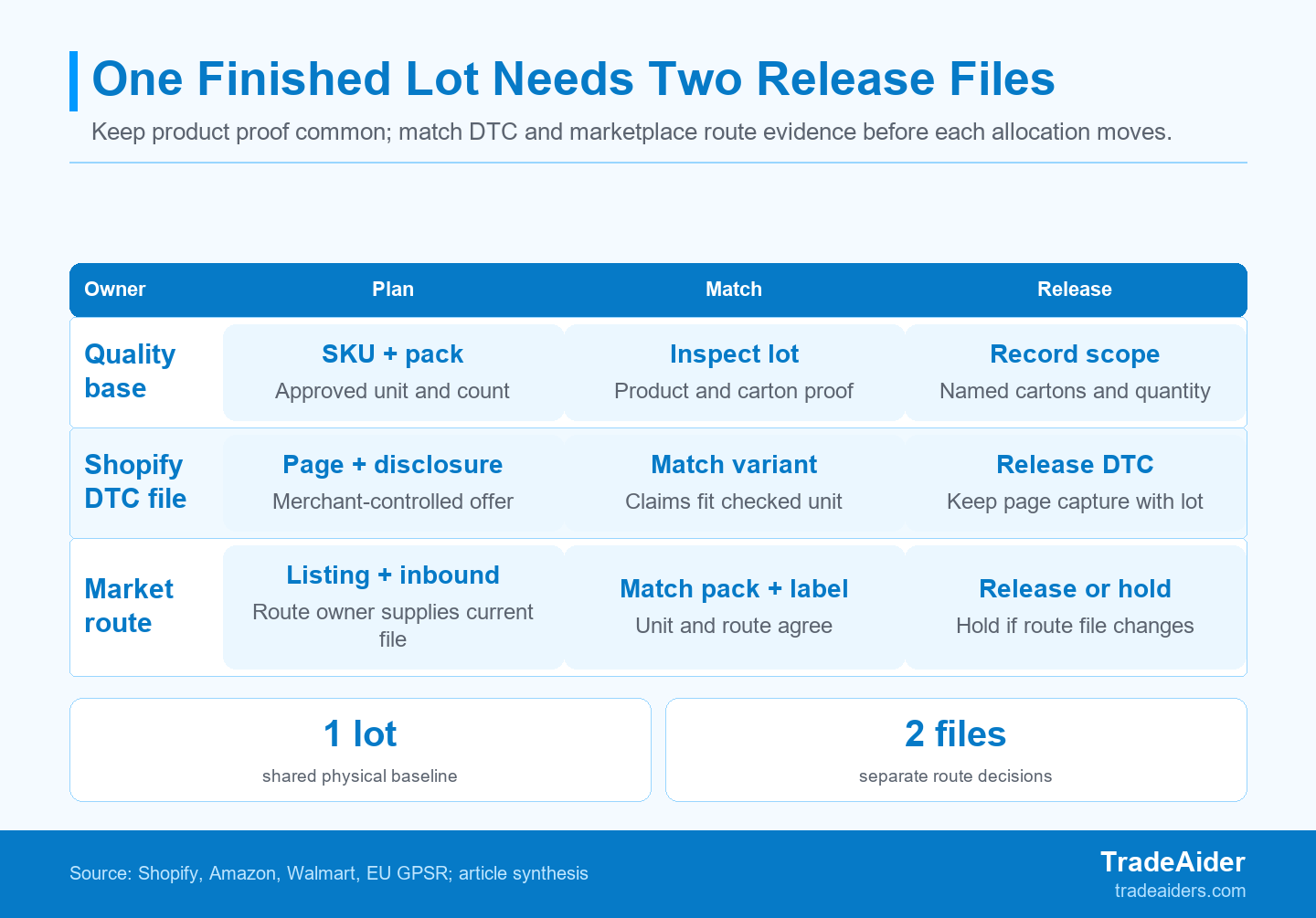
One physical inspection baseline can support both routes only when each allocation's current file still matches the checked unit and pack.
That distinction is important when one purchase order supplies more than one channel. A product can meet agreed workmanship, function, dimensions, contents, and pack checks, yet still be unsafe to release into a particular route because the current listing describes another variation or the fulfillment reference identifies another pack. The discrepancy is a release-file issue; it does not turn the physical inspection into a platform audit.
Five Release Rules for One Physical Baseline
A route-ready allocation has one checked physical baseline plus a current channel file, a named change trigger, and a clear release or hold authority.
- Use the same approved SKU, variant, product, and pack reference for physical inspection across both allocations.
- For Shopify DTC, retain the product-page, disclosure, and pack version that describes the inspected unit.
- For a marketplace, reconcile the current listing, any requested documentation, and any applicable unit-label or inbound reference with that same unit.
- Reopen the route decision after a change to the product, pack, SKU, customer-facing claim, listing, or inbound file.
- Hold the identifiable allocation that no longer matches; do not assume every carton in the purchase order needs the same outcome.
Keep One Physical Quality Baseline for Both Routes
A cross-channel inspection starts with the same checked product identity, workmanship, function, pack configuration, and shipment quantity for the named SKU and variant. If the Shopify unit and the marketplace unit are genuinely the same sellable configuration, the sampling plan, critical-to-quality points, and defect classification can start from the same approved reference.
Build this lane around facts an inspector can observe or document: SKU and variation, material or component reference where relevant, dimensions, functional checks, appearance, retail-pack contents, markings supplied for the product, outer-carton quantity, and carton traceability. Do not let the channel name replace those facts. “Marketplace inventory” is not a product specification, and “Shopify stock” is not a release standard. A TradeAider inspection scope can record those agreed physical checks separately from the channel team's live platform decisions.
| Evidence lane | Question before release | Common across routes? |
|---|---|---|
| Physical product | Does this SKU and variant match the approved product reference? | Yes |
| Retail and shipment pack | Do the contents, count, markings, and carton map describe the checked allocation? | Yes |
| DTC offer file | Does the merchant-controlled product page describe the checked unit and pack? | Shopify allocation |
| Marketplace route file | Do the live route references match the checked unit, listing, and handoff configuration? | Marketplace allocation |
Verify the Unit and Pack Before You Discuss a Listing
The unit and its retail or shipment pack should be checked first because all later DTC and marketplace references need to identify the same physical configuration. Start with the sellable unit, not with a screenshot. Record the SKU, variation, colour or size where applicable, unit count, included components, product measurements, retail-pack contents, and the outer-carton range that contains that configuration.
This sequencing prevents a common mistake: matching a correct web title to the wrong pack. A listing can say “set of two” while the finished retail pack contains one unit, or a parent SKU can contain variations with different dimensions. The inspector does not decide what the website should promise. The inspection brief should simply name which physical facts must be reconciled with the route file after the unit and pack are checked.
Match Customer-Facing Claims to the Checked Variant
Customer-facing claims should be tied to the exact checked variant and pack rather than assumed from a similar sample, old SKU, or parent listing. Treat a claim as a reference field: product name, size, capacity, material statement, included quantity, warning, compatibility statement, or care instruction. It should lead back to a named unit and its current packaging.
The goal is not to ask an inspector to rewrite product copy. It is to expose contradictions while a buyer can still correct the physical goods, the pack, or the route reference. If a claim cannot be linked to the checked variant, mark it as an unresolved release point. A clear mismatch is more useful than a vague “listing checked” note because it tells the owner whether the next action belongs to the factory, the brand team, or the marketplace operations team.
For Shopify DTC, Freeze the Merchant-Controlled Offer File
Shopify's Terms make the merchant responsible for the store, materials, goods, customer relationship, required legal disclosures, and regulatory compliance, so a DTC release file should preserve the product-page information that matches the inspected unit. See Shopify's Terms of Service. For a Shopify DTC allocation, retain the current product-page capture, product title and variation, relevant customer-facing facts, disclosure or warning version where supplied, and the pack reference reviewed at inspection.
“Freeze” does not mean that a Shopify page can never change. It means the release owner can answer a basic question later: which page and pack version described these cartons at the time of release? Assign a page owner, include the capture date or version reference, and state what happens if the copy changes after the physical check. If the product description changes from one unit to two, or from one size to another, the existing inspection may no longer prove the same customer promise.
For relevant EU DTC sales, distance-sale offer information may be required in addition to product-level traceability and safety evidence, depending on the product and market. The European Commission's GPSR business presentation explains why online offers need their own information review. The exact obligation depends on the product and market, so the route file should identify the responsible reviewer rather than assume a factory check decides it.
In short, the Shopify DTC inspection plan changes by adding an offer-to-unit check: the merchant-controlled page, disclosure fields where relevant, and retail pack must describe the allocation the inspector actually examined. It does not need marketplace receiving documentation unless that allocation will also use a separate marketplace fulfillment route.
For a Marketplace, Add Listing and Receiving Evidence
A marketplace route can require product- or SKU-level documentation to be submitted or tracked inside a platform compliance workflow. Amazon's Manage Your Compliance guidance, for example, describes submitting and tracking requested product-safety and regulatory documents by product, ASIN, or SKU. That does not make every marketplace identical, but it shows why the marketplace file should name the current product identifier and the document owner instead of relying on a generic inspection report.
Where a marketplace fulfillment route is used, the route file also needs the current unit-label and inbound-prep reference because receiving readiness is tied to the applicable shipping plan. Amazon's current FBA prep and labeling guidance says that units need correct barcodes, secure packaging, and a scannable, receiving-ready condition; the relevant prep and label details depend on the product and shipping plan. FBA means Fulfillment by Amazon. Use it here as a route-specific example, not as a universal marketplace rule.
Marketplace listing quality can turn product names, descriptions, features, and images into operational references that should be reconciled with the checked unit. Walmart Marketplace's Listing Quality guidance includes those content elements. Before release, compare the fields that identify the product and pack with the checked variant. A marketplace file should make it obvious which listing, variation, label reference, and shipping or receiving reference belong together.
For a marketplace allocation, add three practical controls to the physical file:
- Listing identity: the platform product identifier, variation, and customer-facing facts that must match the checked unit.
- Route evidence: any document, label, preparation, or inbound reference the responsible channel team has confirmed for that allocation.
- Handoff boundary: the carton range, quantity, and owner who can hold or release the allocation when those references change.
Do not overstate this control. A third-party inspection can photograph an agreed label, count units, and compare a supplied reference against the finished goods. It cannot determine whether a platform will accept a listing or whether an account has supplied every required document. Those remain live route decisions for the merchant and the relevant platform process.
Use Different Change Triggers, Not Different Defect Standards
On a shared marketplace catalog, a seller may not fully control all customer-facing content, so the release plan needs an explicit post-inspection change trigger. Walmart Marketplace notes in its content-error guidance that multiple sellers can submit updates and a seller might not always control the product name, site description, or images on a shared product page. Put that trigger in the route file instead of assuming the screenshot remains current.
An inspection can verify the production lot and supplied references; it cannot approve a platform account, a live listing, or legal compliance on the merchant's behalf. The useful rule is simple: a change to the product, pack, SKU, claim, listing, unit-label reference, or inbound file requires the release owner to decide whether the existing evidence still describes the affected allocation.
If the change happens while production is still running, it is usually easier to compare a changing SKU during production than to discover the mismatch after cartons are allocated. The inspection request should say whether the new reference needs a full reinspection, a focused recheck, a fresh photo record, or a release-file update only.
Keep Destination-Market Evidence Outside the Channel Debate
Destination-market information duties can apply to a distance-sale offer as well as the physical product, so channel planning is not a substitute for market-specific compliance review. The European Commission's GPSR presentation for businesses is one example of why online offer information and product traceability belong in the same release conversation for relevant sales.
This is not a Shopify-only issue or a marketplace-only issue. The route changes who controls the product page and which operational references accompany the allocation, but the destination market can still require separate review. Keep the responsibility explicit: the brand or designated compliance owner confirms the current product and market requirements; the inspector verifies the agreed physical and packaging facts; the release owner decides whether the route file is complete enough to move the allocation.
Place Inspections Where the Relevant File Is Still Current
Place inspection at the stage where the named physical reference and the route file can still be reconciled before shipment or inbound handoff. Pre-shipment inspection normally means the order quantity is 100% complete and at least 80% packed. That timing is valuable for a final product and pack comparison, but it is too late if the route file changes after the cartons have already left the factory.
For stable products, prepare the physical reference and both route-file checklists early, confirm changes during production, then verify finished, packed goods before shipment. For a late listing, pack, or unit-label change, do not silently reuse an earlier result. Identify the cartons and decide whether a focused recheck can establish the new match. If the allocation boundary is unknown, widen the hold until it is traceable.
Illustrative Scenario: One Lot, Two Release Decisions
This illustrative scenario is not a TradeAider client case. In the illustrative scenario, the physical lot passed its agreed checks while the marketplace allocation was held because its listing and inbound references described a different pack configuration. The brand has 2400 fabric under-bed organizers from one finished lot: 1200 units are assigned to Shopify DTC and 1200 to a marketplace fulfillment route. The agreed physical check confirms the named SKU, dimensions, one-unit retail pack, workmanship, and carton quantities.
The Shopify product-page capture, SKU, dimensions, and one-unit retail pack match the DTC allocation. The marketplace listing reference, however, still says “two-unit pack,” even though the marketplace cartons contain one unit per retail pack. The marketplace inbound sheet and unit-label map apply only to the 1200 marketplace units in cartons M21 to M40, so the operations team can identify the affected allocation without confusing it with the Shopify cartons.
Release the Verified Shopify Allocation
The Shopify allocation can release only after its merchant-controlled page and inspected pack match the same allocation. In this example, the full 2400-unit order is split into two 1200-unit channel allocations, and the DTC match is available: the product-page capture, dimensions, SKU, and one-unit retail pack all describe the Shopify units. The release record should retain the page capture date, pack specification, relevant inspection photos, carton range, and the name of the person who approved the DTC allocation.
Notice what is not being claimed. The inspection did not approve the Shopify store or decide every market requirement. It established that the agreed physical facts and the supplied merchant-controlled offer file described the same DTC allocation at the point of release. If the page changes after release, the merchant still owns the next route-file decision.
Hold the Marketplace Allocation Until Its Route File Matches
The marketplace cartons remain on hold until their listing and inbound route file are corrected and the affected units receive a focused recheck. The factory quality result is not the conflict; the listing and route file point to a different pack configuration. The team removes the outdated two-unit reference, corrects the marketplace route file through the responsible channel process, updates the carton map, and keeps the one-unit marketplace pack evidence with cartons M21 to M40. This example illustrates allocation control only; it does not decide platform acceptance, legal compliance, or a seller-account outcome.
Those cartons may move only when the current listing, inbound reference, unit-label association, carton map, and inspected one-unit pack identify the same allocation. This is a split release, not a blanket rejection: the evidence supports the Shopify allocation, while the marketplace allocation has an identifiable route-file mismatch. The scenario illustrates release control only; it does not predict platform acceptance or a seller-account outcome.
Send an Inspection Brief That Names the Channel Route
An inspection scope is most useful when it names the product identifiers, customer-facing claims to reconcile, current pack references, channel route, allocation boundary, and release authority. Give the inspector one agreed physical checklist, then attach a Shopify DTC offer file or a marketplace route file for the allocation being checked.
For each allocation, include: SKU and variant; approved product and retail-pack reference; claims or fields that need reconciliation; carton range and quantity; current product-page capture or marketplace listing reference; any supplied unit-label, preparation, or inbound reference; required evidence photos; the person authorized to release or hold; and the change trigger that invalidates the file. That turns a generic “QC report” request into a decision-ready brief.
TradeAider can help translate that file into a China-side inspection request. The scope should remain specific about what is being checked and should not promise platform approval or a compliance result; when the product, listing, and inbound reference are ready, request an e-commerce inspection scope with the current listing and inbound references.
Frequently Asked Questions
Does Shopify Remove the Need to Verify Product Page Claims?
No. Shopify places responsibility for the merchant-controlled store and product offer with the merchant, rather than with an independent product inspection. See Shopify's Terms. Verify that the checked SKU, variant, pack, and relevant page facts describe the same allocation. The inspection can document agreed physical facts and supplied references; the merchant still owns the store content and any later page change.
Can a Pre-Shipment Inspection Approve an Amazon Listing?
No. A pre-shipment inspection can document agreed product and packing facts, but it cannot approve an Amazon listing, account workflow, or compliance outcome. Amazon's compliance workflow may request product-level documents, while an inspector can compare the supplied unit and pack references with the finished goods. Keep those responsibilities separate: the channel owner manages the live listing and documentation; the inspection verifies the agreed physical population.
Why Can a Marketplace Inbound Label Change the Release Decision?
A marketplace fulfillment route can require current unit-label and receiving references, so a correct product may still need a route-file hold when its inbound reference is wrong. The question is not whether the carton contains a good product in isolation. It is whether the current unit, pack, label, carton map, and route reference identify the same allocation. If they do not, correct the route file and use a focused recheck where necessary.
Which Changes Require a New Inspection or Focused Recheck?
A product, pack, label, SKU, customer-facing claim, or route reference change requires a fresh decision about whether the existing check still describes the affected allocation. A purely administrative change may need only a release-file update. A changed unit, pack count, label applied to goods, or claim tied to the product can require a focused recheck or broader inspection. Use traceability to define the affected cartons before deciding the scope.
Artículos Relacionados



Haga crecer su negocio con el Servicio TradeAider
Haga clic en el botón de abajo para ingresar directamente al Sistema de Servicios TradeAider. Los pasos simples desde la reserva y el pago hasta recibir los informes son fáciles de operar.