- О нас

- Наши услуги
- Ваша отрасль
- Ресурсы
- Новости и блог

You've sourced a batch of e-readers from a Chinese factory. The supplier's samples looked clean. But once your first container of units arrives, customer reviews start mentioning faint shadows of previous pages — a ghostly outline of whatever was on-screen before. By then, you're fielding returns, rewriting product listings, and explaining to Amazon why your ratings dropped.
Ghosting and sluggish page-turn response are the two most complained-about quality defects in e-readers, and they're also the two most overlooked during pre-shipment inspection. This guide explains what both mean technically, what benchmarks you should be testing against, and how to build a QC checklist that catches these issues before a single unit ships.
Key Takeaways
- E-Ink ghosting is structural, not random — it stems from waveform mismatch, temperature sensitivity, or inadequate full-refresh cycles that can and should be tested at the factory.
- Page-turn latency varies dramatically by waveform mode: GC16 takes 700–1,200 ms while A2 mode compresses refresh to roughly 120 ms — buyers must specify which mode applies to their target use case.
- A clear QC checklist with defined pass/fail thresholds for ghosting visibility and latency — verified by AQL-based sampling — is the only reliable way to catch display defects before shipment.
What E-Ink Ghosting Actually Is (and Why It's Not Always a Defect)
The Physics Behind Ghosting
E-Ink displays work by suspending millions of microcapsules filled with charged black and white pigment particles between transparent electrode layers. When voltage is applied, particles migrate to the surface to form text or images. The critical difference from LCD or OLED: once those particles are in position, they stay there even when power is removed. That bistability is what gives e-readers their weeks-long battery life.
The downside is that particles have memory. As Viwoods explains in their display analysis, ghosting occurs when pigment particles fail to fully realign during a screen update, leaving subtle traces of the previous image. The root cause is almost always a mismatch between the waveform driving the display and the content being rendered — or insufficient voltage duration to push particles all the way to their new positions.
This means ghosting is not purely random. It is predictable, measurable, and in many cases preventable — which is exactly why it belongs on your inspection checklist.
When Ghosting Becomes a Defect Classification Issue
For QC purposes, not all ghosting is equal. The industry typically maps display artifacts to three defect tiers:
| Defect Class | Ghosting Manifestation | Typical Cause | AQL Treatment |
|---|---|---|---|
| Critical | Permanent ghosting that persists across full refreshes; display unusable | Waveform file corruption or panel defect | Zero tolerance |
| Major | Ghosting visible after standard GC16 full refresh; clears only after 2+ deep refreshes | Firmware waveform misconfiguration; panel grade | AQL 1.0 or tighter |
| Minor | Faint residual after partial/A2 refresh; clears on next full refresh | Expected behavior in fast-mode operation | AQL 2.5 with documented disclosure |
The distinction matters because minor ghosting in A2 mode is technically within spec — it is an acknowledged trade-off of the fast refresh waveform. What you are testing for is whether ghosting appears where it should not: in GC16 (full quality) mode, or whether it persists beyond a single full-screen deep refresh cycle.
Waveform Modes and Their Latency Benchmarks
The Three Waveforms Every Buyer Needs to Understand
The speed and quality of every page turn on an E-Ink device is governed by its waveform — the precise sequence of voltage pulses the controller sends to move pigment particles. E Ink Corporation keeps specific waveform implementation details under NDA with manufacturers, but the major mode categories are publicly documented. E Ink's waveform mode declaration document defines the primary modes buyers and QC teams should know:
GC16 (Grayscale Clearing, 16-level): The highest-quality mode. The controller drives particles through a full reset — pushing them to black or white first, then to the precise target tone. As displaymodule.com's technical breakdown explains, this multi-stage operation takes 700 to 1,200 ms in total but produces sharp text, deep black levels, and no ghosting residue from the previous page. The visible full-screen flash during GC16 updates is normal and expected.
Regal / GL16 (Partial, reduced-flash): The mode used on Kindle Paperwhite, Kobo, and most mainstream e-readers. It achieves a balance by using targeted voltage sequences to cancel out ghosting without a full black-white flash. The result is a page-turn experience of approximately 450 ms with minimal visible flash. This is the benchmark most buyers should be testing against for standard e-reader products.
A2 (Animation / Fast): A speed-priority mode that drops all grayscale: pixels can only be driven to pure black or pure white. Refresh time compresses to roughly 120 ms, enabling smooth scrolling and cursor tracking. The cost is increased visible ghosting and reduced text sharpness. As Orient Display's engineering notes state, A2 mode uses dithering algorithms to simulate gray — which increases visual noise and ghosting as a known trade-off.
Latency Pass/Fail Benchmarks for QC Testing
| Waveform Mode | Expected Latency Range | Ghosting Tolerance | Fail Condition |
|---|---|---|---|
| GC16 (Full Quality) | 700–1,200 ms | Zero residual ghosting after update | >1,500 ms or visible ghosting post-refresh |
| Regal/GL16 (Standard) | 350–500 ms | Faint residual acceptable; must clear on next page | >600 ms or ghosting persists 2+ pages |
| A2 (Fast/Animation) | 100–150 ms | Ghosting expected and permitted | >250 ms or ghosting persists after GC16 refresh |
| DU (Direct Update) | 120–300 ms | Black/white only; no gray tolerance | Grayscale artifacts visible |
The key insight: your QC checklist must specify which waveform mode applies to each test scenario. A page-turn latency reading of 450 ms is a pass in Regal mode and a failure in A2 mode. An inspector testing with the wrong mode assumption will deliver a meaningless result.
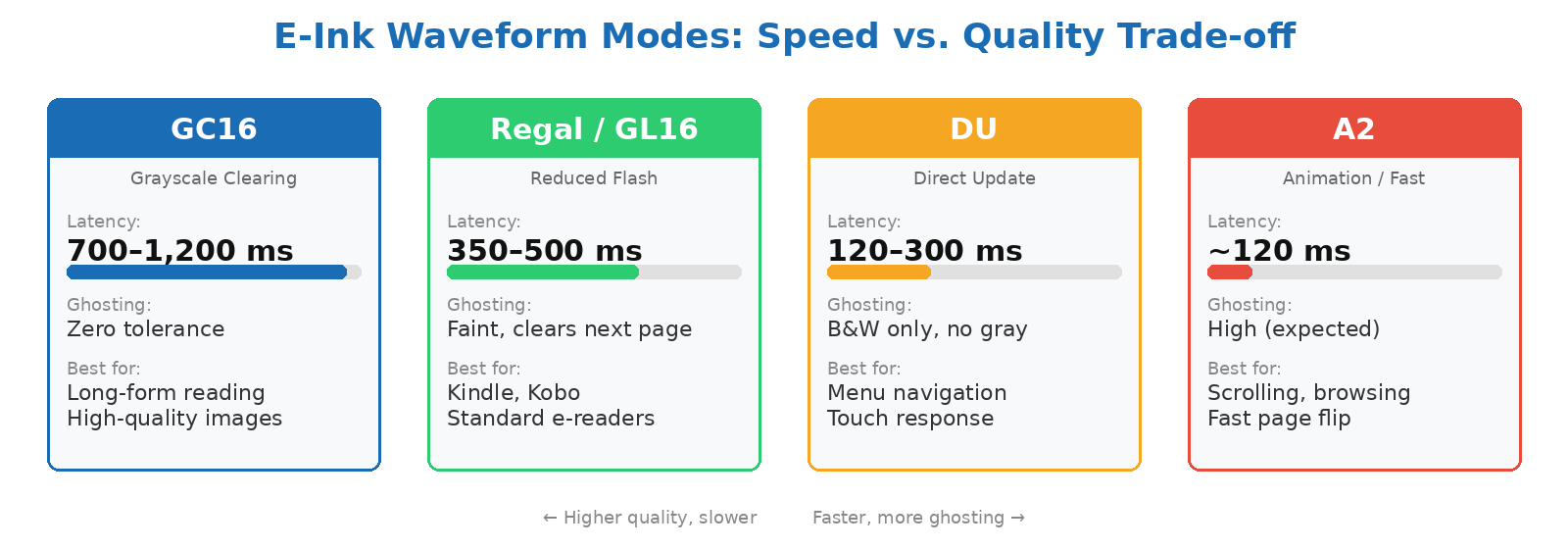
E-Ink waveform modes: the speed–quality spectrum from GC16 (high quality, slow) to A2 (fast, ghosting-prone).
Factors That Amplify Ghosting in Factory Conditions
Temperature: The Hidden Variable
E-Ink microcapsule behavior is highly temperature-dependent. Waveform lookup tables (LUTs) stored in the display controller are calibrated for specific temperature ranges — typically with separate voltage sequences for cold, ambient, and warm conditions. Visionect's display engineering blog notes that particle movement becomes sluggish at lower temperatures, requiring adjusted voltage timing to achieve clean transitions. If a factory is testing units in an unheated warehouse in winter, or in a hot storage area in summer, ghosting readings will not reflect real-world performance at shipping temperature.
Your QC checklist should specify a target ambient temperature range for display testing — typically 20–25°C — and require the inspector to record the actual temperature at time of testing.
Panel Grade and Firmware Pairing
Not all E Ink panels are equal. Viwoods' ghosting analysis confirms that older or lower-tier panels have slower response times and less refined refresh capabilities, making them more prone to ghosting. Color E Ink panels — those using Kaleido or Gallery filter arrays — are significantly more sensitive because the additional color layer slows pigment transition and increases visual complexity.
A factory substituting a lower-grade panel revision midway through a production run — without updating the corresponding firmware waveform file — is one of the most common root causes of batch-to-batch ghosting variation. This is precisely the kind of issue a during-production inspection (DPI) is designed to catch: checking that the correct panel lot is being installed and that firmware versions match the panel's calibrated waveform.
Partial vs. Full Refresh Frequency
Most e-reader firmware allows users to configure how often the display triggers a full GC16 refresh versus a faster partial update. Geniatech's refresh technology overview describes how manufacturers combine partial refresh with historical frame compensation — keeping a record of previous pixel states to cancel ghosting during partial updates. When this algorithm is disabled or misconfigured, partial refreshes accumulate residual artifacts across multiple pages.
Test this at inspection by turning pages continuously for 20 cycles in partial-refresh mode, then examining for artifact buildup. If ghosting is visible by page 5 or 6 without a full refresh having been triggered, that is a firmware configuration issue the factory needs to correct before shipment.
Building an E-Reader Display QC Checklist
Core Test Protocol for Ghosting and Latency
A functional e-reader display inspection covers four distinct test categories. Effective QC checklists must not only define what to test but specify the equipment required, who provides it, and the exact pass/fail criteria — otherwise inspectors will apply their own interpretation:
1. Static ghosting test: Display a high-contrast checkerboard or dense text page, then immediately switch to a blank white page using GC16 mode. Inspect the blank screen under a lightbox or strong side-light for residual patterns. Any visible ghosting = Major defect.
2. Accumulated partial-refresh ghosting test: Execute 20 consecutive page turns in Regal/partial mode without triggering a full refresh. On page 21, trigger a full GC16 refresh and inspect. Any ghosting that survives the full refresh = Critical defect.
3. Page-turn latency measurement: Using a stopwatch or video capture at minimum 60 fps, measure from touch input to display fully settled (no visible pixel movement). Record results for GC16 and Regal modes separately. Compare against the benchmark table above.
4. Deep refresh recovery test: After 20 pages of A2-mode operation, trigger a manual deep refresh. The display must return to a clean state with no residual artifacts within one full refresh cycle.
AQL Sampling and Sample Size
Display tests are functional tests — not purely visual inspections. TradeAider Quality's inspection methodology notes that functional testing typically uses a separate sample size from the visual AQL sample. For a batch of e-readers, a common approach is:
- Visual inspection (cosmetic, labeling, packaging): AQL 2.5 for major defects, AQL 4.0 for minor
- Functional display testing (ghosting, latency): AQL 1.0 for critical and major display failures — treated the same as a safety-functional defect because a malfunctioning display makes the product unsellable
- Full-refresh deep recovery test: 100% of functional test sample, not a subset
TradeAider's inspection team builds display-functional test protocols into pre-shipment inspection checklists for electronics buyers. If you're importing e-readers and need a checklist aligned to these benchmarks, pre-shipment inspection with a customized QC checklist is the place to start.
Color E-Ink: A Higher Bar for Ghosting Control
Why Color Panels Need Stricter Standards
Color E Ink devices — those using Kaleido, Gallery 3, or similar color filter arrays over a monochrome base panel — present a harder ghosting challenge. As eReadersForum's 2026 analysis of Boox color tablets shows, ghosting removal has become the primary quality differentiator between otherwise identical-spec devices. The difference between a premium color e-reader and a mediocre one is increasingly measured in how quickly and cleanly the display resolves artifacts — not in processor speed or storage.
For color e-reader inspection, add the following tests to your standard protocol: display a full-color image with saturated reds and blues, then switch to a white page. Color ghosting — faint color tints on the white background — is a Major defect on color panels even if black text ghosting passes. Color ghosting is typically caused by improperly matched waveform files for the color filter lot.
Security Implication Worth Noting for B2B Buyers
Good e-Reader has documented that severe ghosting in password-entry screens can expose typed characters to bystanders. For enterprise e-reader deployments (logistics, warehouse scanning, field documentation), this is not just a cosmetic issue — it is a security consideration that should be included in your defect classification and may affect acceptable AQL levels.
What to Require From Your Factory
Documentation the Factory Should Provide
Before booking an inspection, require these documents from your supplier as part of your pre-production verification:
- Panel lot number and E Ink Carta generation — confirms which waveform file should be installed
- Firmware version and waveform build date — ensures waveform was calibrated for this panel lot, not an earlier revision
- Factory QC test log for display ghosting — most reputable factories run a 100% display power-on test; ask for the pass/fail log, not just their assurance
- Temperature at time of factory QC testing — if the factory tested in winter at 10°C, results are not valid for a 22°C target market
If the factory cannot or will not provide panel lot documentation, treat this as a supplier management red flag. A factory audit that includes a review of production records and incoming material inspection logs will surface whether the supplier has adequate traceability for display components.
Frequently Asked Questions
Is E-Ink ghosting always a defect I can reject a shipment for?
Not automatically — it depends on the waveform mode and whether your QC checklist defines a specific threshold. Minor ghosting in A2/fast mode is expected and within spec; ghosting that persists through a full GC16 refresh is a major defect you can legitimately reject against. The critical step is having a written pass/fail criterion in your inspection checklist before the inspection happens, so there is no ambiguity between you, the inspector, and the factory.
What equipment does an inspector need to test page-turn latency on-site?
A smartphone or camera capable of slow-motion video capture (120 fps or higher) is the most practical tool for measuring latency at the factory — you review the footage to count frames between touch input and display settling. A stopwatch alone is not accurate enough for sub-500ms measurements. Your checklist should specify that video capture equipment is required and clarify whether the buyer or inspector provides it. Higher-precision testing with dedicated display analyzers is available in laboratory settings but is not typically feasible on the factory floor.
How does temperature affect ghosting test results at the factory?
Significant temperature variance — anything outside 15–30°C — can cause ghosting test results to differ substantially from real-world performance. E-Ink waveform LUTs are temperature-calibrated, meaning the controller adjusts voltage timing based on ambient temperature. In cold conditions, particles move more slowly, and the same voltage sequence that produces a clean refresh at 22°C may leave visible artifacts at 8°C. Always specify the required ambient temperature range in your QC checklist and have the inspector record it.
Should I test every unit for ghosting or use AQL sampling?
AQL sampling is standard for most display tests. However, a 100% power-on functional check — where every unit is powered on and cycled through at least one full refresh — should be confirmed as part of the factory's own outgoing QC process. Your third-party inspection then validates a statistical sample against the full benchmark protocol. If the factory cannot confirm 100% power-on testing is performed on their line, that is a process gap worth flagging in a factory audit before placing large orders.
At what production stage should I inspect e-reader display quality?
Display quality issues are best caught early — either at the component receiving stage (incoming panel inspection) or during production when approximately 30–50% of units are assembled. By the time goods are fully packaged, a firmware or panel-lot problem can affect the entire batch. A during-production inspection that checks panel lot conformance and runs ghosting tests on in-progress units gives you the best chance to correct issues before they compound across the full order quantity.
Display defects in e-readers are caught at the factory or they land in your customers' hands. TradeAider's inspection team builds functional display test protocols — including ghosting benchmarks and latency checks — directly into pre-shipment inspection checklists for electronics buyers sourcing from China. Book a pre-shipment inspection or use the Inspection Charge Calculator to estimate costs for your next e-reader order.
Похожие статьи



Развивайте свой бизнес с услугами TradeAider
Нажмите кнопку ниже, чтобы войти непосредственно в систему услуг TradeAider. Простые шаги от бронирования и оплаты до получения отчетов легко выполнить.