
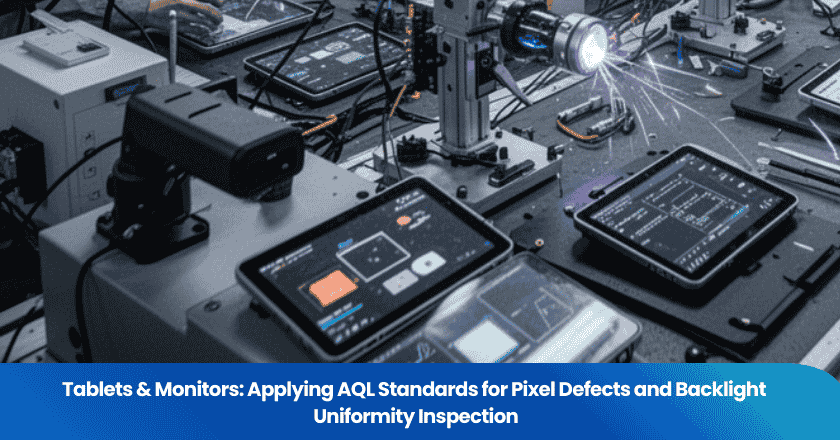
Display defects are invisible in the factory carton and brutally visible the moment a customer powers on the product. A single bright hot pixel near the center of a tablet screen. A cloudy backlight patch in the lower-left quadrant of a monitor. These are not marginal quality issues — they are the defects that generate one-star Amazon reviews that read "DOA," "screen defect out of the box," and "paid $X for a dead pixel." The challenge for importers is that generic AQL inspection protocols were designed around tangible defects — dimensions, color, function — not the optical characteristics of a display panel. Applying AQL correctly to pixel defects and backlight uniformity requires a different approach: specific defect definitions, a pixel fault classification framework grounded in ISO standards, and a practical inspection method that a third-party inspector can execute on the factory floor without specialized optical equipment. This guide provides exactly that.
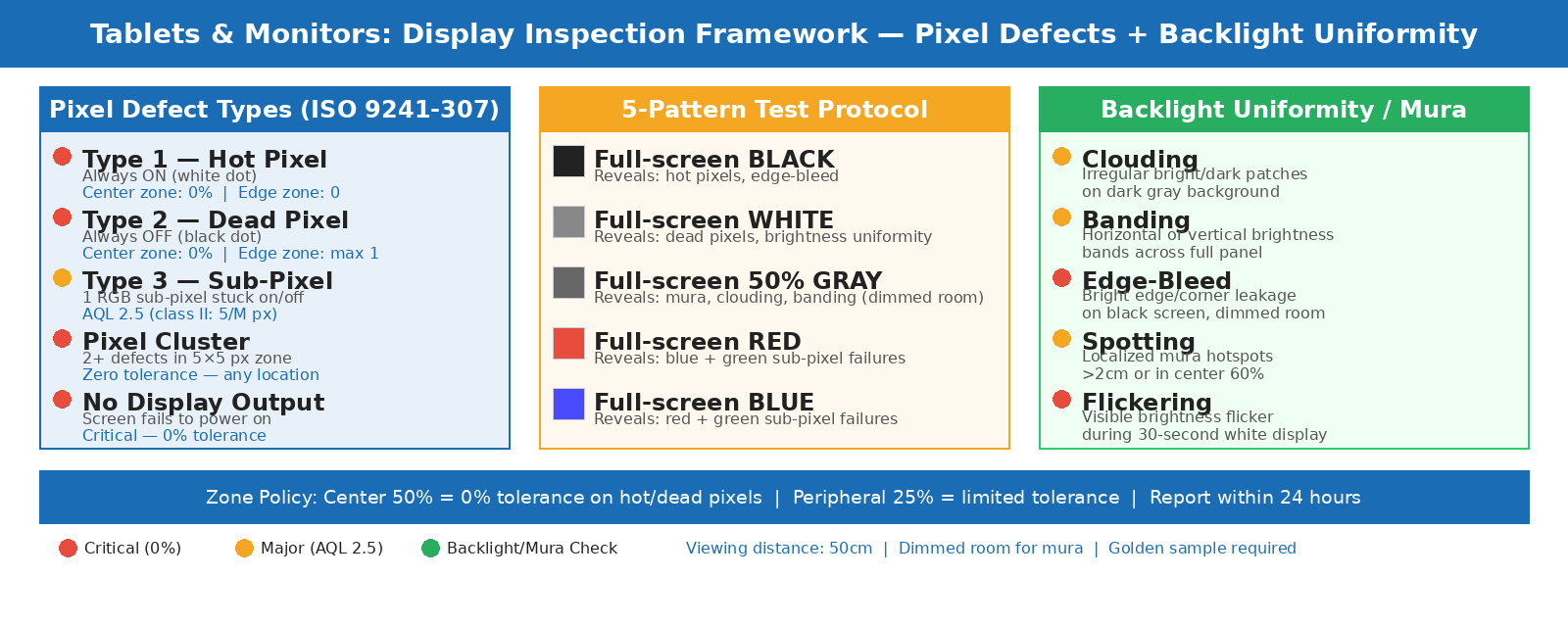
Display inspection framework: pixel fault classification against ISO standards and backlight uniformity assessment in a pre-shipment visit.
Key Takeaways
- Pixel defects are classified into three types under ISO 9241-307 (the successor to ISO 13406-2): Type 1 (always-on/hot), Type 2 (always-off/dead), and Type 3 (sub-pixel defects). Your AQL checklist must define tolerances for each type separately — not as a single "pixel defect" catch-all.
- Backlight non-uniformity — including "mura" (cloudiness, banding, or spotting) — is one of the most common display defects in tablets and monitors sourced from Chinese factories, and it requires a specific dark-room viewing test with a gray test pattern to detect reliably.
- For consumer tablets and monitors, a zero-tolerance policy on Type 1 hot pixels in the center zone and a tightly capped tolerance on total pixel faults is the most defensible standard — and it differs significantly from the default "Class II" tolerance most factories assume applies.
Understanding Display Pixel Defect Classifications
The ISO Standard That Governs Pixel Fault Tolerance
The reference standard for display pixel defects is ISO 13406-2, now superseded and updated by the ISO 9241-302/303/305/307 series. The standard is best known for defining four classes of display devices with different acceptable pixel defect counts. Understanding the class system is essential for importers because the class you specify determines the contractual quality obligation for your factory — and most factories default to "Class II" unless a different standard is specified in the purchase order.
The standard defines three distinct pixel defect types:
Type 1 — Hot pixel (always on): A pixel that is permanently lit in white, regardless of the displayed image. This is the most visually noticeable defect type because it appears as a bright white spot against any dark content. Type 2 — Dead pixel (always off): A pixel that never illuminates, appearing as a permanent black dot. More noticeable on white or light backgrounds. Type 3 — Sub-pixel defect: One or more of the three sub-pixels (red, green, blue) within a pixel is stuck on or off, producing a colored dot that shifts the apparent color of that pixel location.
The standard also defines cluster defects — areas where multiple pixel defects occur within a 5×5 pixel zone. A single cluster of two or more Type 1 or Type 2 defects in close proximity is counted and tolerated differently from dispersed individual defects. Clusters are more visually disruptive than isolated defects, even when the total defect count is the same.
The Four ISO Classes: What Each Means for Your Product
Most manufacturers specify their products as Class II, which is the default for general consumer display products. Panel manufacturers use their own internal grading systems that map to these ISO classes — with some premium suppliers offering "zero pixel defect" (Z-grade) panels that go beyond Class I. Here is how the four classes compare:
| ISO Class | Type 1 Allowed (per 1M px) | Type 2 Allowed (per 1M px) | Type 3 Allowed (per 1M px) | Typical Application |
|---|---|---|---|---|
| Class I | 0 | 0 | 0 | Medical, professional imaging, premium B2B |
| Class II | 2 | 2 | 5 | Consumer electronics — most manufacturers default |
| Class III | 5 | 15 | 50 | Economy / budget consumer products |
| Class IV | 50 | 150 | 500 | Factory reject / refurbished — not consumer shipping standard |
The practical implication for most Amazon FBA sellers and direct-to-consumer importers is that Class II is too permissive. A 1080p monitor has approximately 2 million pixels. Class II at 2 Type 1 defects per 1 million pixels allows up to 4 permanently lit hot pixels on a single panel. Four visible bright white dots on a consumer monitor will generate a return and a negative review regardless of how the factory labels its pixel policy. Consumer expectations for tablets and monitors in 2025 have moved well past what ISO Class II permits — particularly for hot pixels (Type 1), where consumer tolerance is essentially zero.
Why Consumer-Grade Products Need Tighter Standards Than ISO Class II
For consumer tablets and monitors sold through e-commerce, the practical standard that protects your return rate and review profile is stricter than ISO Class II. The recommended approach is a zone-based pixel policy: zero tolerance for any Type 1 (hot) or Type 2 (dead) complete-pixel defects within the central 50% of the display area (the most visually prominent zone), and the ISO Class II tolerance only for the peripheral 25% border zone. Type 3 sub-pixel defects in the peripheral zone are the only category where the ISO Class II tolerance of 5 per million pixels is commercially defensible. This zone-based approach aligns with how consumers actually perceive pixel defects: a dead pixel in the bottom corner is annoying but tolerable; the same pixel two inches from the center of the screen is a product return.
TradeAider's inspection teams regularly encounter the gap between factory-assumed standards and buyer-expected standards in display product inspections. Providing a written pixel policy document — not just a reference to "ISO Class II" — that specifies zone tolerances, cluster rules, and minimum defect-to-defect spacing is the only way to make your expectation unambiguous. Without it, a factory that ships a panel with three hot pixels in the corner zone and one dead pixel near the center has technically delivered "ISO Class II" goods — and can legitimately dispute a rejection.
Backlight Uniformity: The Defect Category Most Importers Miss
Understanding Mura and Why It Escapes Generic Inspection
Backlight non-uniformity — known in the display industry as "mura," a Japanese term meaning unevenness — is one of the most commercially damaging defects in tablet and monitor production, and one of the most difficult to detect without a specific test setup. Mura manifests as clouding (uneven backlight patches), banding (horizontal or vertical brightness bands), or spotting (localized bright or dark zones) across the display surface. It is caused by variations in liquid crystal alignment thickness, LED backlight inconsistencies, optical film irregularities, or mechanical stress on the panel housing during assembly.
The reason mura escapes generic pre-shipment inspection is that it is invisible when the display is off, nearly invisible when the display is showing a bright image, and most obvious on a uniform medium-gray test pattern in a dimmed environment. A factory inspector who powers on each sampled unit and views a standard interface at normal brightness will not see mura defects that a consumer will notice the first time they open a dark-themed website or view a full-screen gray image. This is not a hypothetical — it is the most common gap in display product inspection that TradeAider's teams see when buyers provide overly generic inspection instructions.
The Three Types of Mura That Appear in Consumer Displays
Backlight uniformity defects in consumer monitors and tablets fall into three practical categories for inspection purposes:
Clouding: Irregular bright or dark patches that appear on a dark gray or black background. Caused by LED backlight clusters illuminating unevenly behind the diffuser film. Most visible in dimmed environments during dark content playback. Classified as a major defect when covering more than 5% of the display area or when visible under normal indoor lighting conditions. Banding: Horizontal or vertical bands of slightly different brightness that cross the full width or height of the display. Caused by uneven LED strip distribution or optical film alignment. Visible on a uniform medium-gray test pattern (50–60% brightness). Classified as a major defect when bands are visible at 50 cm viewing distance under normal lighting. Spotting (Mura hotspots): Localized circular or irregular bright zones, often near screen edges or corners, caused by light guide plate imperfections. Classified as major when the spot diameter exceeds 2 cm or when it is in the central 60% of the screen area.
How to Test Backlight Uniformity at Factory Inspection
A practical backlight uniformity inspection does not require a colorimeter or a spectroradiometer on the factory floor. The standard method uses test patterns: a full-screen uniform gray at approximately 50% brightness, a full-screen white, and a full-screen black or near-black. The inspector views each pattern from a standard distance (approximately 50 cm) in a dimmed room — not a completely dark room, which over-amplifies minor variations, but a room with curtains drawn or lighting reduced by approximately 70%. Panels that show visible clouding, banding, or spotting on the gray test pattern at this viewing condition are flagged as non-compliant.
The key practical requirements for this test are: a defined display input signal source (a laptop connected via HDMI with the test pattern file pre-loaded), a consistent ambient light level across all sampled units, and a documented pass/fail criterion referenced to the golden sample. Without a golden sample for comparison, subjective uniformity assessments are not defensible in factory dispute resolution. The golden sample defines "acceptable" uniformity for the production batch, and units that clearly deviate from it on the test patterns are the ones to log as non-conforming.
For importers who want objective data on backlight uniformity, luminance uniformity measurement using a luminance meter or imaging colorimeter provides a quantified result — typically expressed as a percentage ratio of minimum to maximum luminance across the panel, with 85% or higher uniformity being the standard for mid-range consumer products and 90%+ for premium products. High-quality display screens are generally expected to achieve 95% or more brightness uniformity. This is a product testing service scope rather than a standard factory inspection task, but it is available when the order volume and product value justify dedicated testing alongside pre-shipment inspection.
Building Your AQL Inspection Checklist for Tablets and Monitors
Display Defect Classification Framework
A complete AQL checklist for tablets and monitors requires mapping both pixel defects and backlight uniformity issues to the appropriate severity tier. The table below provides the practical framework, designed to reflect consumer expectations rather than the minimum ISO Class II standard:
| Defect Type | AQL Class | Consumer-Grade Tolerance | Test Method |
|---|---|---|---|
| Type 1 hot pixel — center zone | Critical — 0% | Zero tolerance in center 50% of display | Full-screen black pattern, visual inspection |
| Type 2 dead pixel — center zone | Critical — 0% | Zero tolerance in center 50% of display | Full-screen white pattern, visual inspection |
| Pixel defect cluster (2+ defects in 5×5 zone) | Critical — 0% | No clusters anywhere on panel | Black + white + red + blue + green patterns |
| Visible backlight clouding / mura — center area | Major — AQL 2.5 | Visible on gray test pattern at 50 cm in dimmed room | 50% gray pattern, dimmed room, golden sample reference |
| Backlight banding (visible horizontal/vertical lines) | Major — AQL 2.5 | Visible at 50 cm under normal inspection lighting | Gray pattern, direct and oblique viewing angles |
| Type 1/2 pixel defects — peripheral zone | Major — AQL 2.5 | Max 1 per unit in outer 25% border zone | Black + white patterns, visual inspection |
| Screen flickering or refresh instability | Major — AQL 2.5 | Any visible flicker during 30-second observation | White screen sustained display, full brightness |
| Backlight edge-bleed (corner/edge brightness leak) | Major — AQL 2.5 | Visible white/yellow edge on black screen in dimmed room | Black screen, dimmed room inspection |
| Touch response failure (for touch-enabled displays) | Major — AQL 2.5 | Any dead zones or mis-registration | Grid touch test across full screen area |
| Minor cosmetic housing scratches | Minor — AQL 4.0 | Fine scratches not visible at 50 cm normal lighting | Visual inspection under standard lighting |
The Test Pattern Protocol: Five Screens Every Inspector Must Run
A display inspection that only powers on the device and checks the operating system interface will miss the majority of pixel and backlight defects. A complete display QC check requires viewing specific test patterns designed to reveal each defect type. The minimum test pattern set for pre-shipment inspection is: a full-screen black pattern (reveals Type 1 hot pixels and edge-bleed), a full-screen white pattern (reveals Type 2 dead pixels), a full-screen 50% gray pattern in a dimmed room (reveals mura, clouding, and banding), a full-screen red pattern (reveals blue/green sub-pixel failures), and a full-screen blue pattern (reveals red/green sub-pixel failures). Each pattern should be held on screen for at least 15–20 seconds with the inspector viewing at a fixed distance of 50 cm.
For touch-enabled devices, add a standardized touch grid test that verifies responsiveness across all zones, including the corners and edges where touch calibration frequently degrades. The five-pattern protocol can be pre-loaded on a standard USB drive and run in under three minutes per unit — adding 5–8 minutes total to the inspection time per sampled unit but dramatically improving the defect detection rate for display-specific failures.
Applying AQL Sample Sizes to Display Products
For a shipment of 500 tablets at AQL General Inspection Level II, the sample size is 80 units. At AQL 0.0 for critical pixel defects, finding a single critical defect in those 80 units results in shipment rejection. At AQL 2.5 for major defects (backlight mura, banding), the accept number for 80 units is 5 — meaning up to 5 units with major display defects may be found before the shipment is rejected. For a shipment of 2,000 monitors, the sample size grows to 125 units.
One important nuance for display products: because each unit requires the five-pattern test protocol running sequentially, the effective inspection time per unit is longer than a standard product inspection. This should be factored into your inspection scope and time allocation. TradeAider's pre-shipment inspection service for electronics can accommodate extended function testing protocols when specified in the inspection instructions — and the real-time report allows you to see how the defect picture develops as the inspection progresses, so you can make shipment decisions before the inspector has finished the full sample.
Common Manufacturing Failures in Tablet and Monitor Production
Panel Grade Substitution
One of the most frequent quality failures in display product production is panel grade substitution — a factory that quoted on an A-grade panel (no pixel defects) delivers production units assembled with B-grade panels (minor pixel defects acceptable). B-grade panels are significantly cheaper and are routinely available in factory supply chains. Without a specific panel grade requirement written into the purchase order, a factory has no contractual obligation to use A-grade panels for every unit. The solution is to specify the panel grade explicitly in your product specification document and require the factory to provide panel supplier certificates that confirm grade for the batch in the shipment.
Mura From Housing Assembly Stress
A common source of mura defects that are not present at the panel manufacturing stage is mechanical stress introduced during assembly of the display into the tablet or monitor housing. If the housing frame exerts uneven pressure on the panel — caused by misaligned mounting clips, incorrect screw torque, or warped housing components — it can compress the liquid crystal layer unevenly, creating visible mura patterns that were not present in the bare panel. This type of mura is not detectable at the panel level; it only appears after final assembly. It is detectable at pre-shipment inspection through the gray test pattern protocol, and it points to a housing assembly process control issue that requires a during-production inspection to catch at the assembly stage.
Backlight Aging Before Shipment
A less obvious defect category is premature backlight degradation. Flickering and brightness inconsistency that emerges during inspection can indicate either a driver circuit issue or early LED backlight degradation. The latter is particularly problematic because a display that passes initial power-on testing may exhibit visible brightness fluctuation within hours of sustained use — which is how a consumer experiences the product, not how a factory QC check tests it. Including a sustained display test (30–60 minutes of continuous operation on a white screen at full brightness) in the inspection protocol for a sub-sample of units can detect this failure mode before shipment.
Frequently Asked Questions
What is the difference between a dead pixel and a stuck pixel on a tablet or monitor?
A dead pixel is permanently off — it never illuminates regardless of the image being displayed, appearing as a black dot on any screen content. A stuck pixel (Type 1 hot pixel in ISO terminology) is permanently on, appearing as a white or colored bright dot that is visible on any dark or dark-colored content. Stuck pixels are generally considered more objectionable than dead pixels because the human eye is more sensitive to bright points against dark backgrounds than to dark points against bright backgrounds. Both are classified separately in ISO 9241-307, and your pixel policy should define tolerances for each independently.
How do I specify my pixel policy to the factory clearly enough to enforce it?
A clear, enforceable pixel policy must include four elements: the defect type definitions (Type 1, Type 2, Type 3 as defined in ISO 9241-307), the zone map (which areas of the display have zero tolerance, which have limited tolerance), the maximum count per unit for each defect type in each zone, and the cluster rule (how many defects within a 5×5 pixel square constitute a cluster, and whether clusters are zero-tolerance). This document should be attached to your purchase order or product specification sheet, acknowledged by the factory in writing, and available to the third-party inspector at the time of inspection. A reference to "ISO Class II" alone is not sufficient — it needs to specify which class applies to which zones.
Can backlight uniformity defects develop after shipment?
Some forms of backlight non-uniformity can develop or worsen over time. Mura caused by LED phosphor degradation or optical film settling can increase in visibility as the product ages. However, the most common factory-sourced mura defects — caused by housing assembly stress or LCD cell manufacturing inconsistencies — are present from production and stable over time. Pre-shipment inspection with a gray test pattern protocol is the most reliable way to identify mura that is already present at the time of shipment. Defects that develop post-delivery are typically warranty and reliability issues addressed through product testing and accelerated aging tests rather than pre-shipment inspection.
My factory offers "100% pixel inspection" on their line. Do I still need third-party pre-shipment inspection?
Factory 100% pixel inspection, when genuinely implemented, addresses individual panel pixel defects during production. But it does not verify that the correct panel grade was used for your order, that mura defects introduced during housing assembly have been caught, that your specific zone-based pixel policy (rather than the factory's default ISO Class II standard) was applied, or that the batch your goods came from matches the specifications in the purchase order. Third-party inspection provides an independent verification layer with your defect definitions, your tolerance standards, and documentation that gives you recourse if non-conformance is found — all of which a factory's own production inspection cannot provide.
Pixel defects and backlight uniformity failures are not random — they are the output of specific manufacturing process gaps that a properly scoped pre-shipment inspection can reliably detect. TradeAider's electronics inspection service covers the full five-pattern display test protocol, panel grade documentation verification, and mura assessment with gray test patterns — with a real-time report during inspection and an official PDF within 24 hours. See how pre-shipment inspection works for display products → or use the Inspection Charge Calculator to estimate the cost for your next order.
Related Articles


Grow your business with TradeAider Service
Click the button below to directly enter the TradeAider Service System. The simple steps from booking and payment to receiving reports are easy to operate.